
Observing SVT-AV1 v2.1.0's improvements: A New Deep Dive
Editorial correction — 7 September 2026
The author’s SVT-AV1 2.0.0/2.1.0 experiments, five short anime samples, settings, graphs, and results are preserved. The sample does not represent all modern video, and no completed visual comparison or new benchmark run has been added. The interpretation and conclusion below are limited to this corpus and these versions.
Introduction
SVT-AV1, the most scalable AV1 encoder, has received a new update and one may wonder if the old presets recommendation still holds today. We will delve into that in this blog post, based on a series of speed and visual quality benchmarks with SSIMULACRA2 and XPSNR of SVT-AV1 2.1.0 on a corpus of varied animated clips.
Feedback
The planned image comparisons were not completed for this article. Its five clips cover several animation characteristics, including grain, 3DCG, and rapid motion, but that diversity does not make them representative of live action, sports, screen recordings, or full-length encodes. The original claim of universal representativeness is withdrawn. Adding XPSNR provides another view of these samples; it does not replace a broader corpus or controlled subjective evaluation. ITU-R BT.500 subjective-assessment methodology.
I have also decided to complement this benchmark of another psychovisually-driven metric (XPSNR) so that double-checking is made easier. Thus, each graph possesses a SSIMULACRA2 version and a XPSNR version. Don’t hesitate to switch between one another!
Methodology
The resources available will range from graphs to image comparisons (WIP). The former has the advantage of being easily understandable, showcasing pure efficiency comparisons between encoder parameters using metrics as the reference, while the latter are image samples from the files encoded during the tests that enable you to check quality for yourself, adding another layer of subjective interpretation to these comparisons.
The testing methodology involves using relatively short video samples from a wide range of modern anime genre, which have been either losslessly encoded with x264 --qp 0 for ease of use or losslessly cut from their source. These lossless files are then pipped into SvtAv1EncApp directly, meaning we are measuring the performance of a single encoder instance and not using chunked encoding. Chunking is an optional workflow with its own resource, boundary, and rate-control tradeoffs. Once an encode is done, SSIMULACRA2 scores are calculated using the Zig implementation, XPSNR scores on the other hand are calculated using a ffmpeg filter, and lots of useful data are aggregated to make the graphs for this benchmark, including encoding time, encode size (bitrate), and metrics scores. Bits per pixel (BPP) is used to compare rate against the selected objective score. Those curves describe this metric/corpus combination, not a direct measurement of perceived quality.
The clips used in this test were acquired legally. The Codec Wiki and its contributors do not endorse media piracy.
SvtAv1EncApp was compiled directly from the v2.0.0 and v2.1.0 source code using the provided Build/linux/build.sh script, Clang 16.0.6, and Profile-Guided Optimization (PGO). The testing machine is comprised of an i3 12100 with 16GB of 3200MHz CL14 DDR4 RAM in Arch Linux with kernel 6.7.7 and the performance governor enabled. All encodes have been made in the same session without rebooting.
Samples
The samples are as follows:
- 11s
Blame!clip which sports 3DCG action with lots of grain, effects and high-contrast elements. - 13s
Blue Lockclip which sports rapid camera movements, complex geometry and high-contrast elements. - 5s
Spy x Familyfirst ending sequence with an extremely high amount of dynamic noise. New most complex source of this set. - 12s
Jigokuraku (Hell's Paradise)flashback clip with huge static grain in a very dark scenery and some action. - 5s
The Garden of Sinnersclean but fast-paced 3DCG scene with explosions.
The resolution of every clip is 1080p, except for the first one which is 1920x804.
All clips have been encoded in a wide quality range, from
--crf 6to--crf 46, by increments of 4.
Without further ado, let’s start with the first comparisons!
Presets comparisons (-1 -> 13 12)
In the following graphs, you may find comparisons between all SVT-AV1 presets, ranging from the slowest --preset -1 to the fastest --preset 12.
Yes, you heard that right. Preset 7 and 13 are no more in v2.1.0. This new update, like the previous one, mostly consisted of optimizing the presets trade-offs. The devs have made the choice to map
preset 7topreset 6andpreset 13topreset 12due to the lack of spacing between the new presets. We will discuss the implications of this further ahead.
--preset X is the only parameter used here, in conjunction with the CRF values. That means everything else is default. The defaults worth mentioning are:
--tune 1: tune PSNR--aq-mode 2: variance deltaq--enable-qm 0: quantisation matrices disabled--irefresh-type 2: closed GOP--enable-tf 1: temporal filtering enabled
And more, like CDEF and restoration enabled, overlays and film-grain disabled…
Efficiency
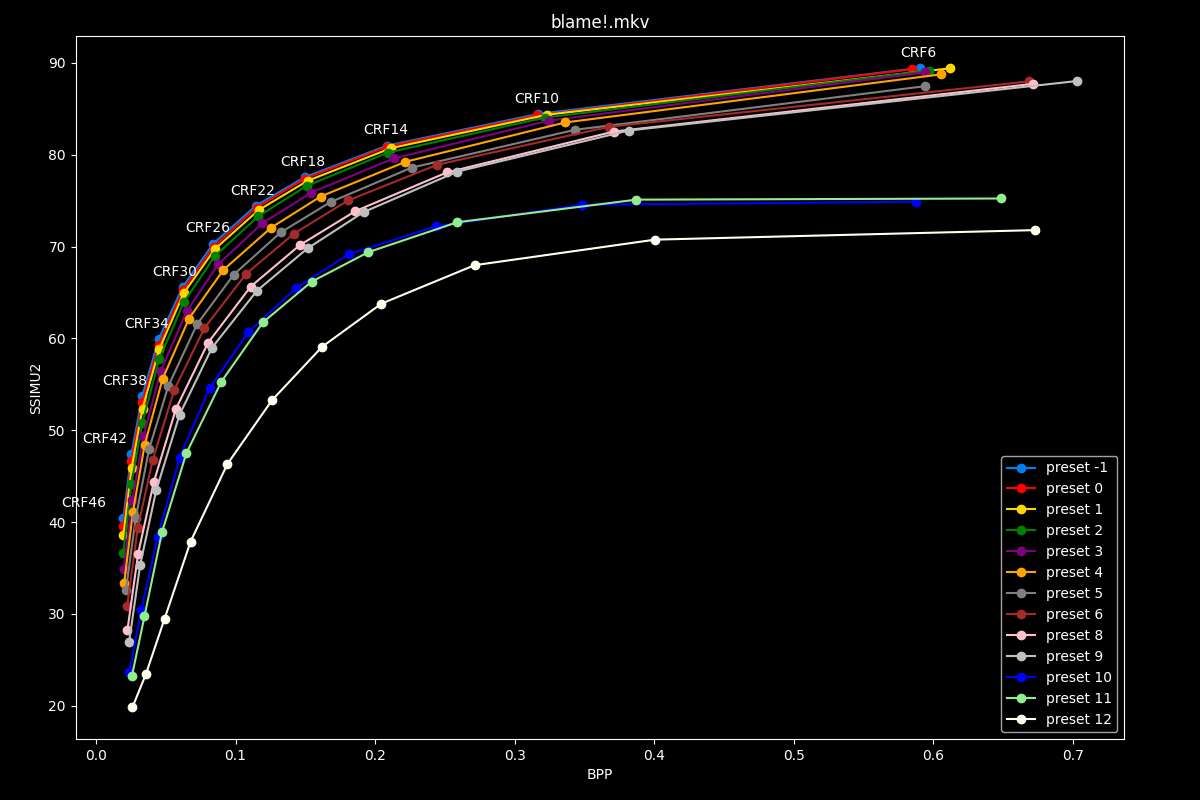
- First of all, here are the full efficiency graphs:
The first image is available above without JavaScript. The complete slide manifest lists every image and alternative description.
This is all very cool, but visually bloated.
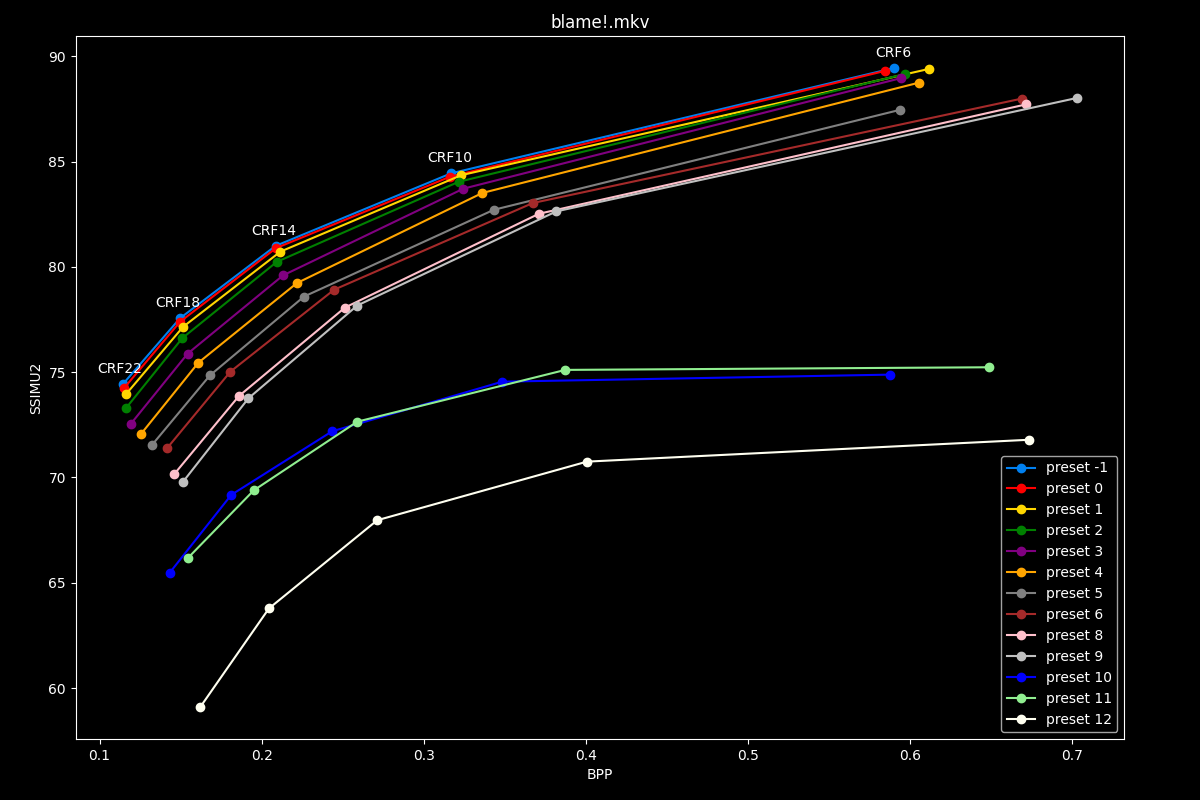
- Now the same graphs but focusing on the “high quality” range (CRF6 -> 22):
The first image is available above without JavaScript. The complete slide manifest lists every image and alternative description.
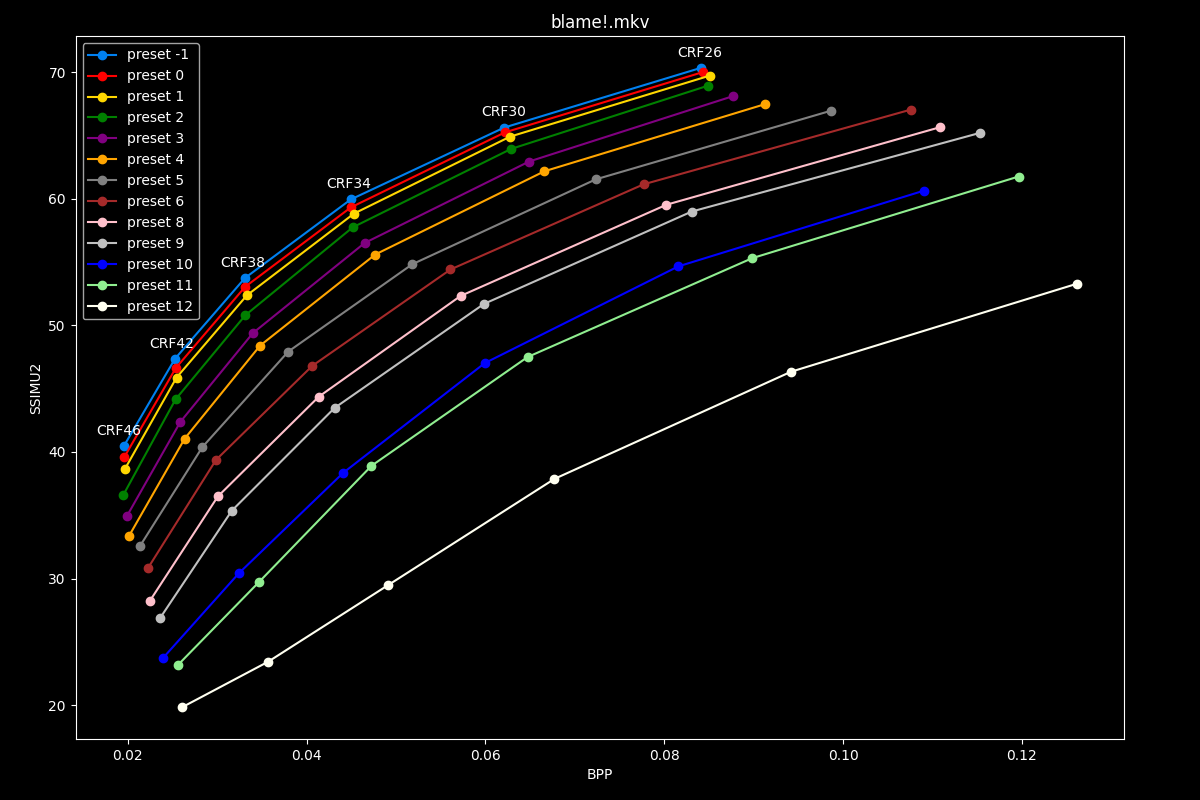
- Same, but now focusing on the “low quality” range (CRF26 -> 46):
The first image is available above without JavaScript. The complete slide manifest lists every image and alternative description.
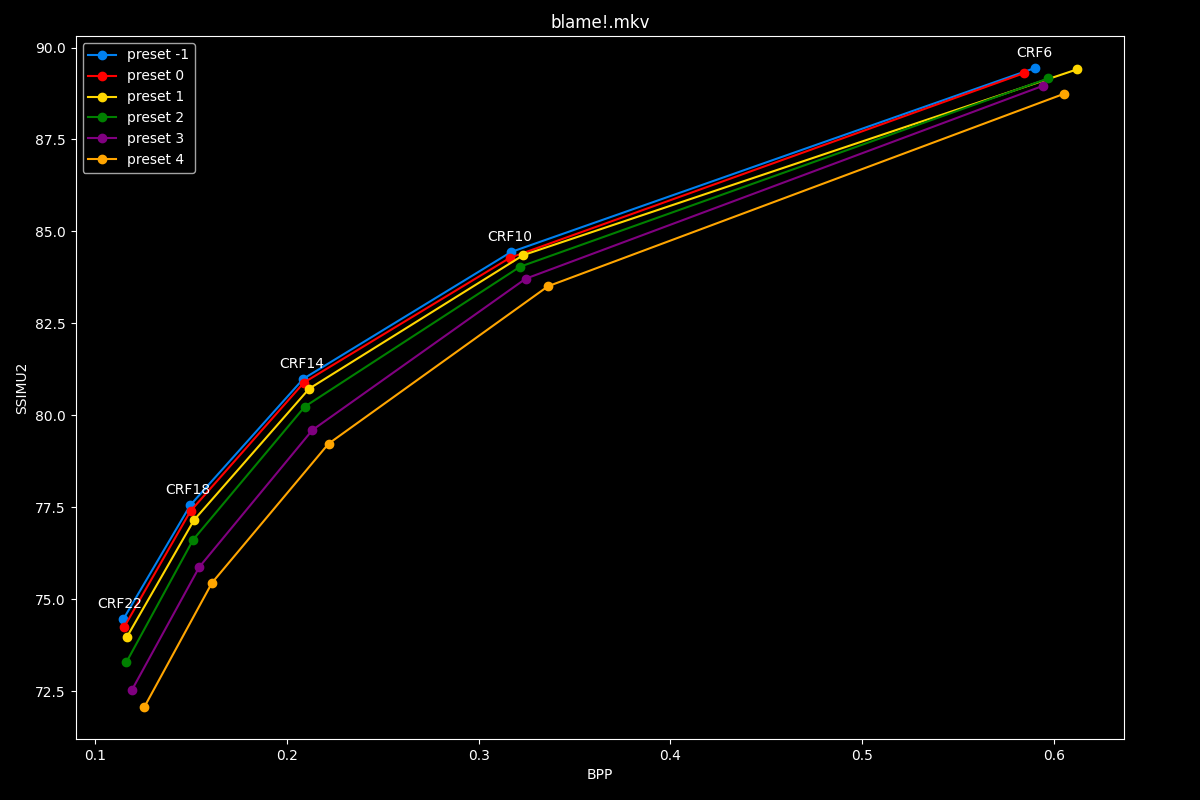
- If we now focus on presets 4 and below, where it’s more difficult to discern the differences between presets, we get this at “high quality”:
The first image is available above without JavaScript. The complete slide manifest lists every image and alternative description.
- And the following at “low quality”:
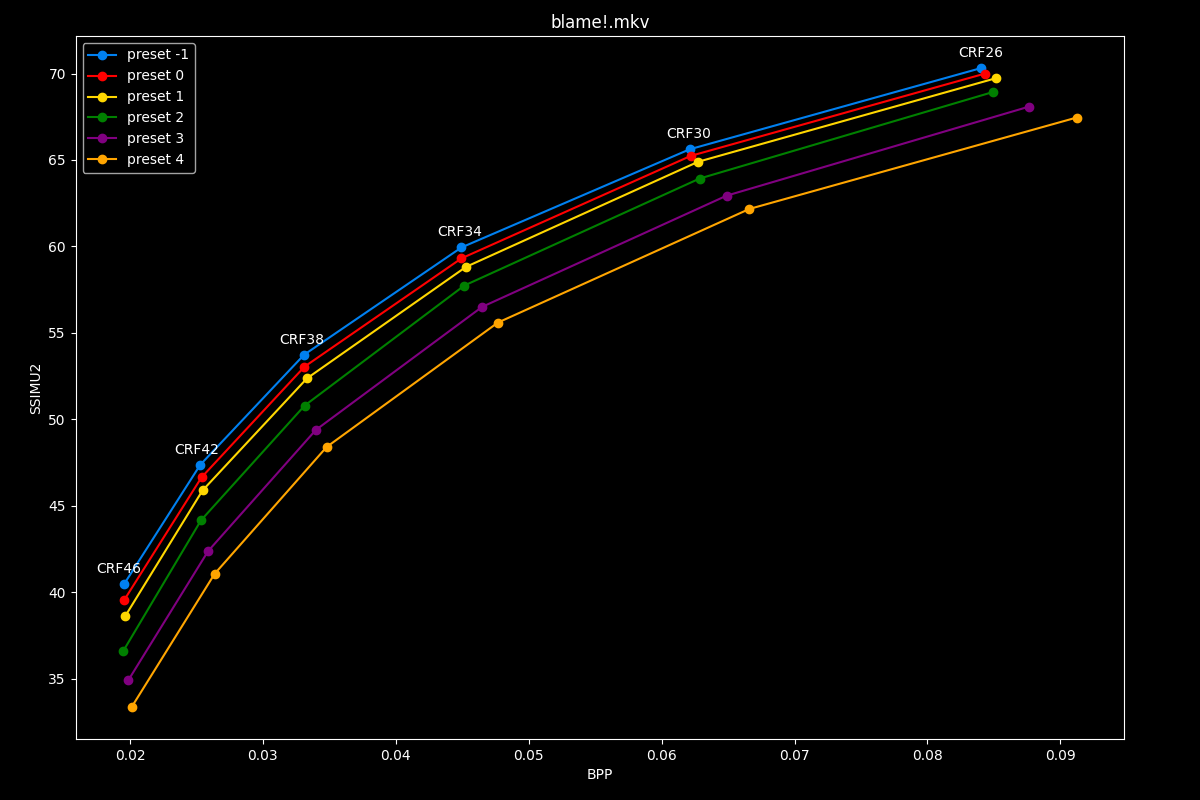
The first image is available above without JavaScript. The complete slide manifest lists every image and alternative description.
Speed
- Let’s now see speed comparisons between all presets:
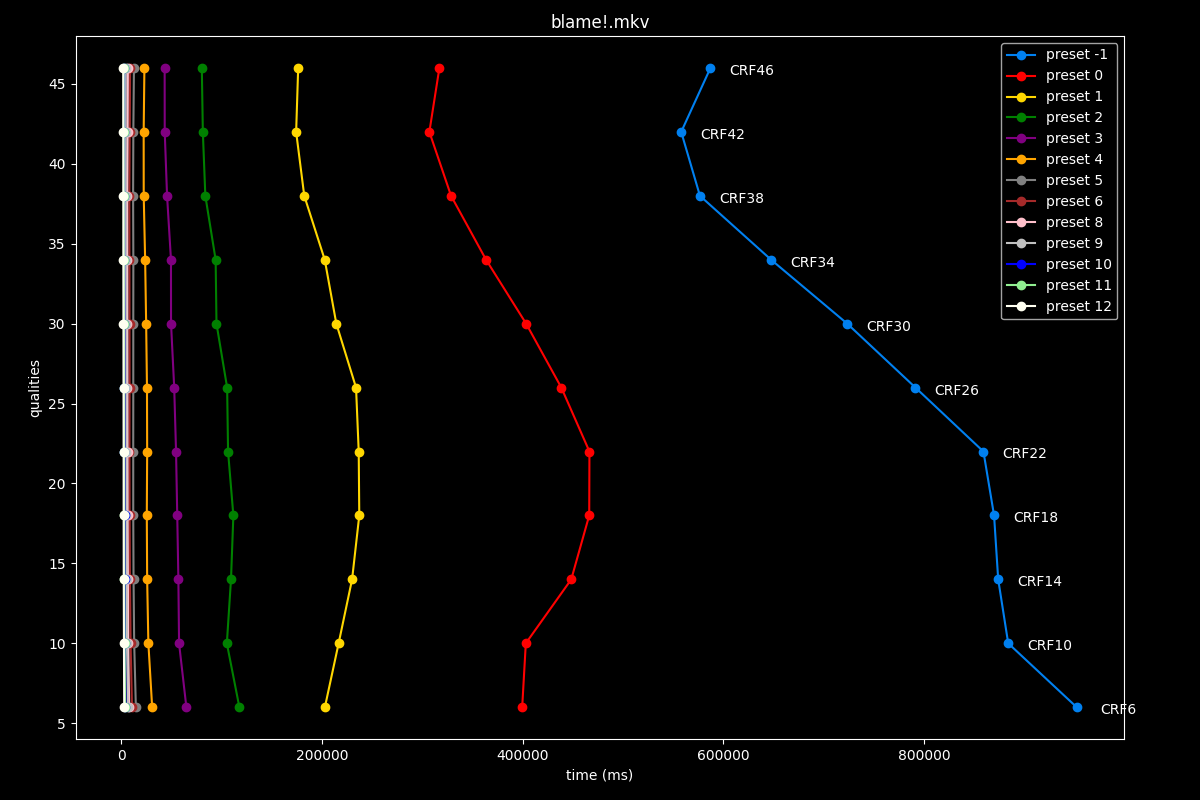
The first image is available above without JavaScript. The complete slide manifest lists every image and alternative description.
Once is not custom, preset -1 is so abysmally slow it makes the graph unusable.
- Same, but without the placebo preset -1:
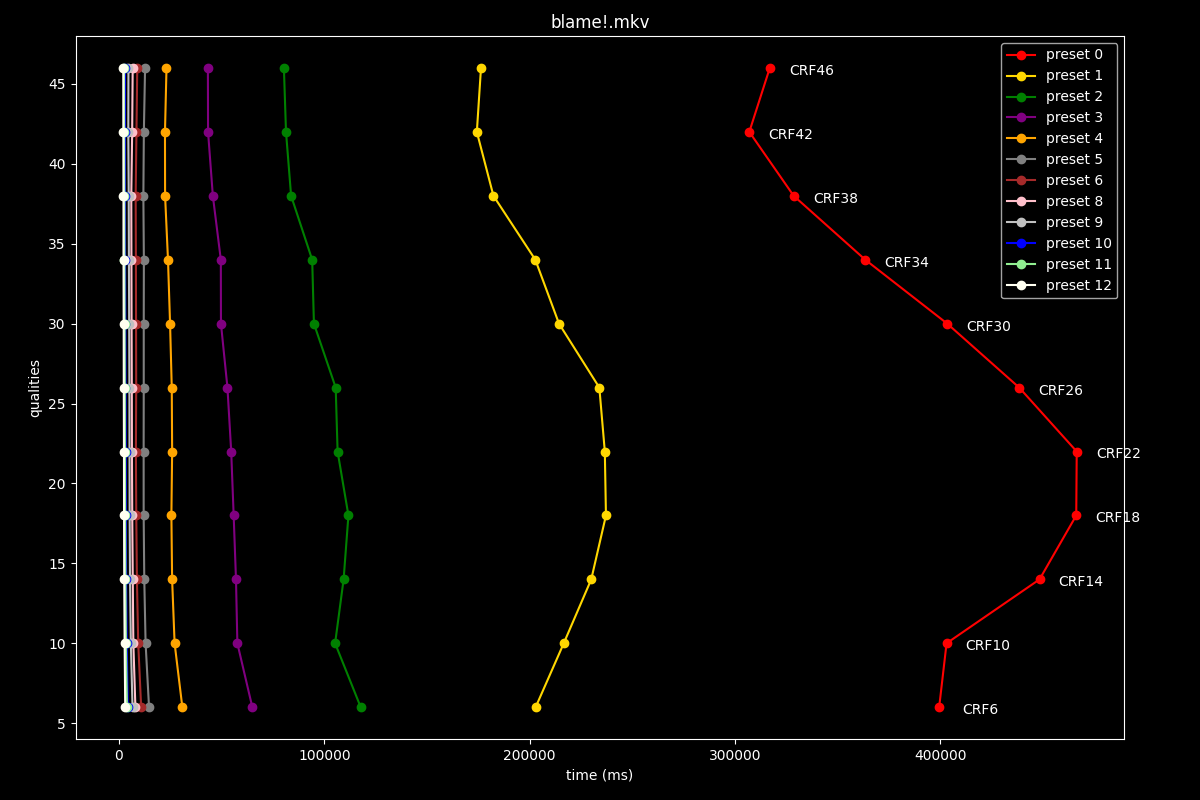
The first image is available above without JavaScript. The complete slide manifest lists every image and alternative description.
- Lastly, here is what it looks like with a logarithmic scale:
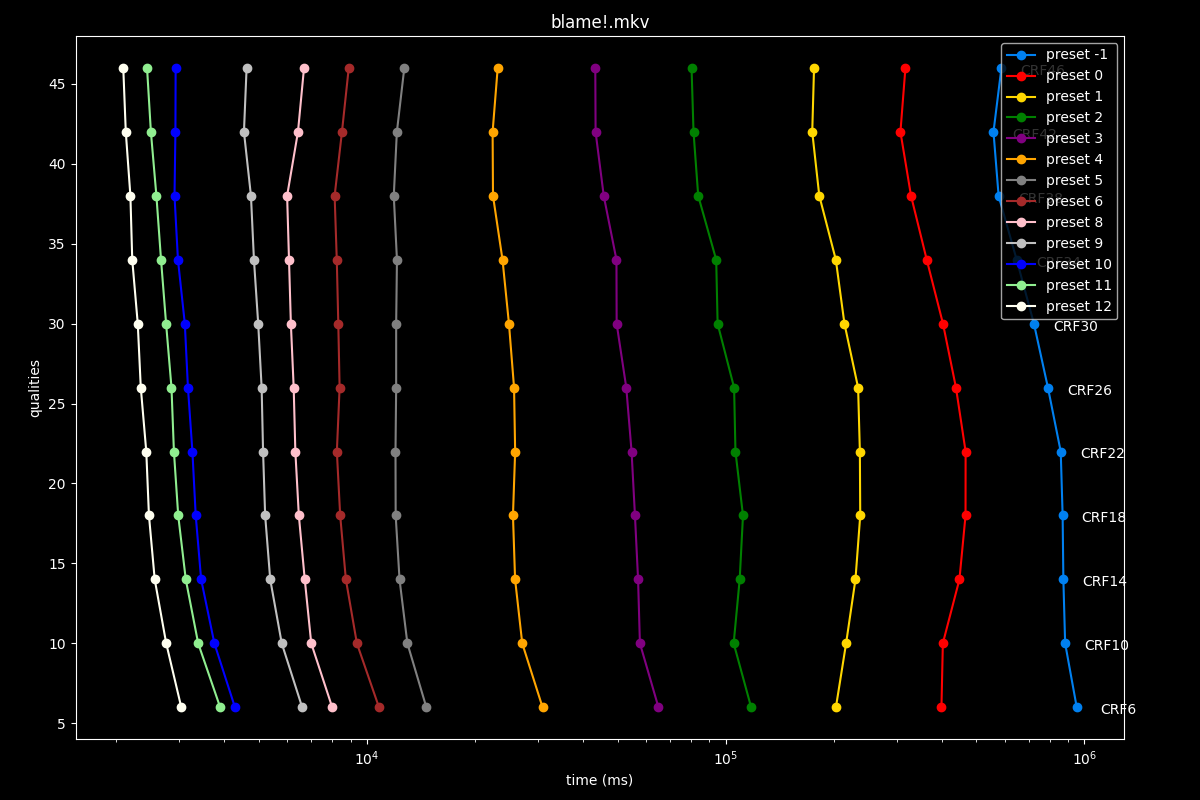
The first image is available above without JavaScript. The complete slide manifest lists every image and alternative description.
Interpretation
Editorially scoped interpretation: on this five-clip SVT-AV1 2.1.0 test, presets 2 and 4 appeared to offer useful score/time tradeoffs, with preset 3 between them. The author’s graphs show relatively small score gains from slower presets at some quality targets, with substantial time costs.
This does not establish that presets 0 or -1 are pointless for every source, or that presets 5–9 satisfy real-time deadlines. The short single-instance runs do not measure live latency, long-duration throughput, or hardware encoders. Similarly, this CRF experiment cannot establish that target-bitrate mode is inherently less efficient.
Use the historical curves to form a shortlist for a matching workload, then compare encodes at similar sizes and inspect playback. Recheck presets with the installed encoder version; numbering and defaults change. Current SVT-AV1 guide.
TLDR
The same conclusions as the previous blog post can be made: clear quality gains can be observed as we decrease presets, until preset 2, however the effectiveness of dropping presets is noticeably less and less important as quality is increased.
In the next part, we will evaluate the differences in efficiency and speed of every presets when updating from SVT-AV1 2.0.0 to 2.1.0, which should enable an increase of nuance from the previous results alone.
SVT-AV1 v2.0.0 vs v2.1.0 presets comparisons:
In the author’s earlier comparison, v2.0.0 presets -1 through 8 appeared similar to v1.8.0 presets 0 through 9 on the selected samples and metrics. That observation is retained. It does not establish a universal regression or explain why upstream release benchmarks differed. Corpus, settings, metrics, hardware, and build configuration can all change measured tradeoffs; the original speculation about developers being misled by metrics was not demonstrated.
The next comparisons examine whether the preset tradeoffs changed on this test corpus.
preset -1: v2.0.0 vs v2.1.0
- Let’s start off with a battle of the placebos, with the efficiency at “high quality”:
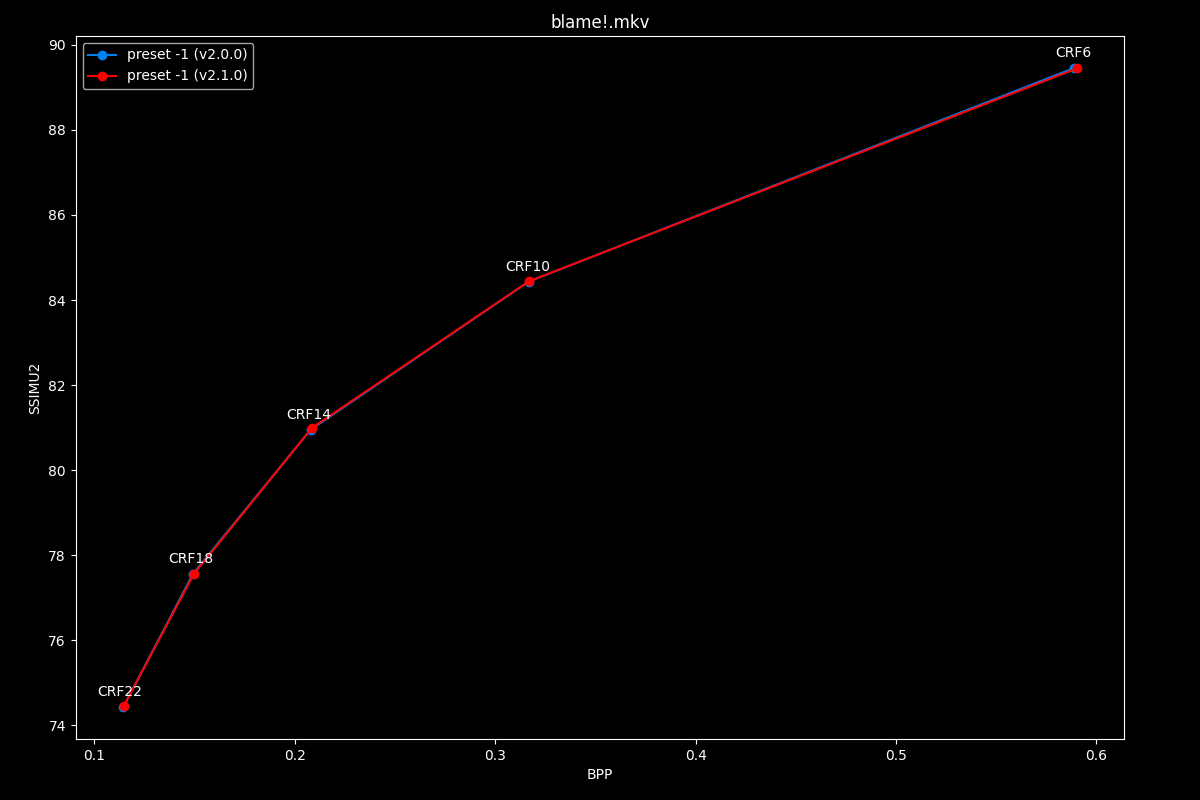
The first image is available above without JavaScript. The complete slide manifest lists every image and alternative description.
- And the efficiency at “low quality”:
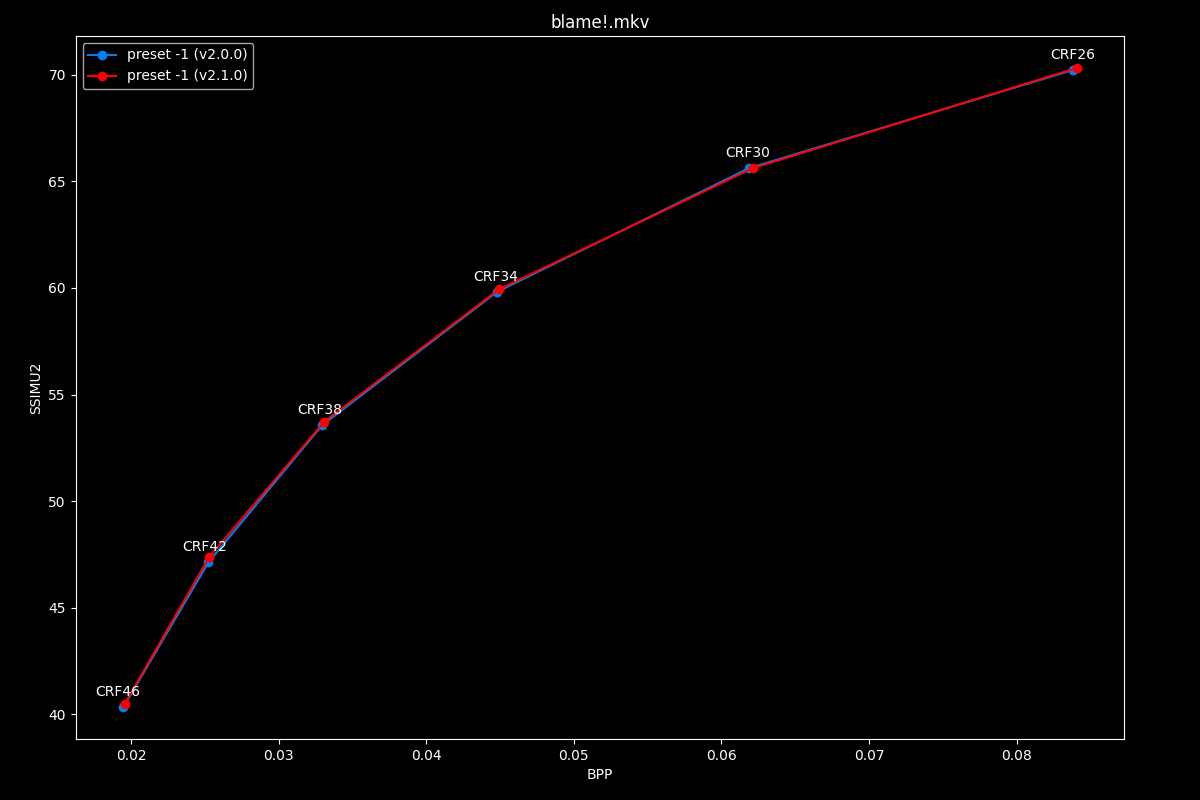
The first image is available above without JavaScript. The complete slide manifest lists every image and alternative description.
Yes, this is a bit underwhelming, but you can’t just improve the best an encoder has to offer with just tweaking right?
- Now, let’s compare their respective speeds:
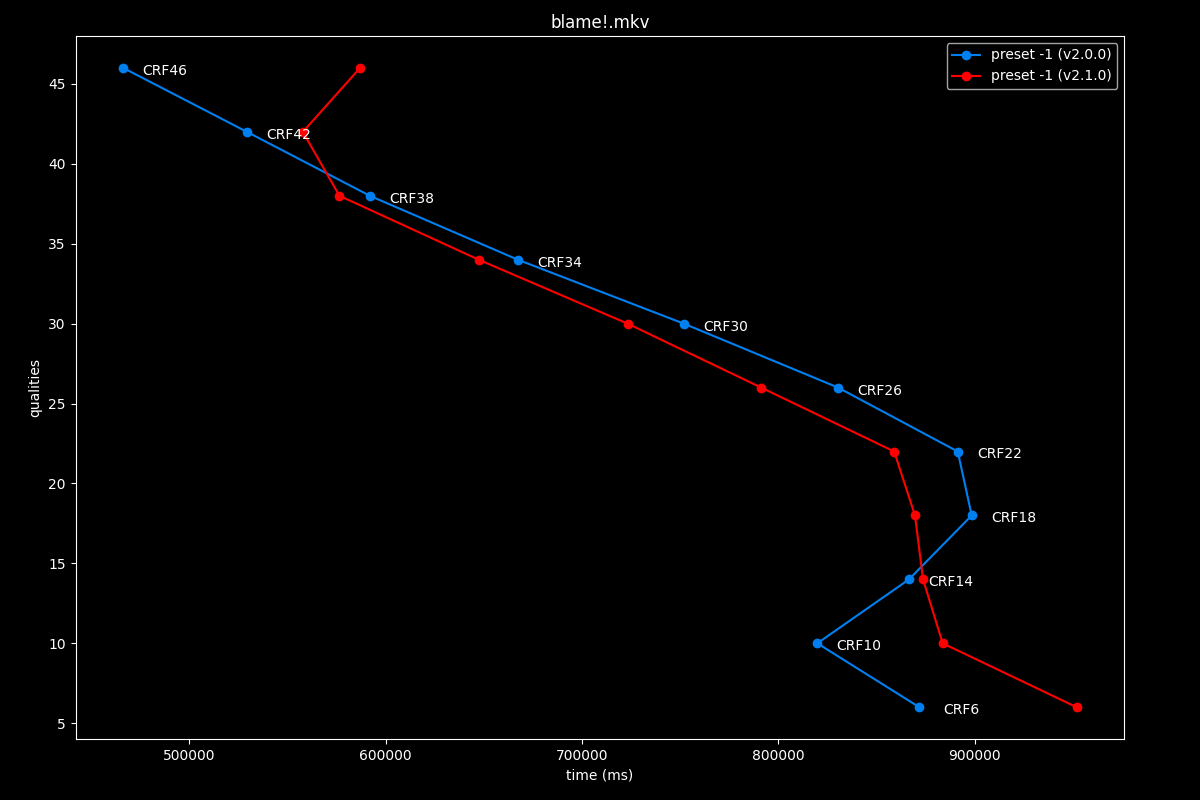
The first image is available above without JavaScript. The complete slide manifest lists every image and alternative description.
Let’s be grateful it became ever so slightly faster, I guess.
preset 0: v2.0.0 vs v2.1.0
- Efficiency graphs, high quality:
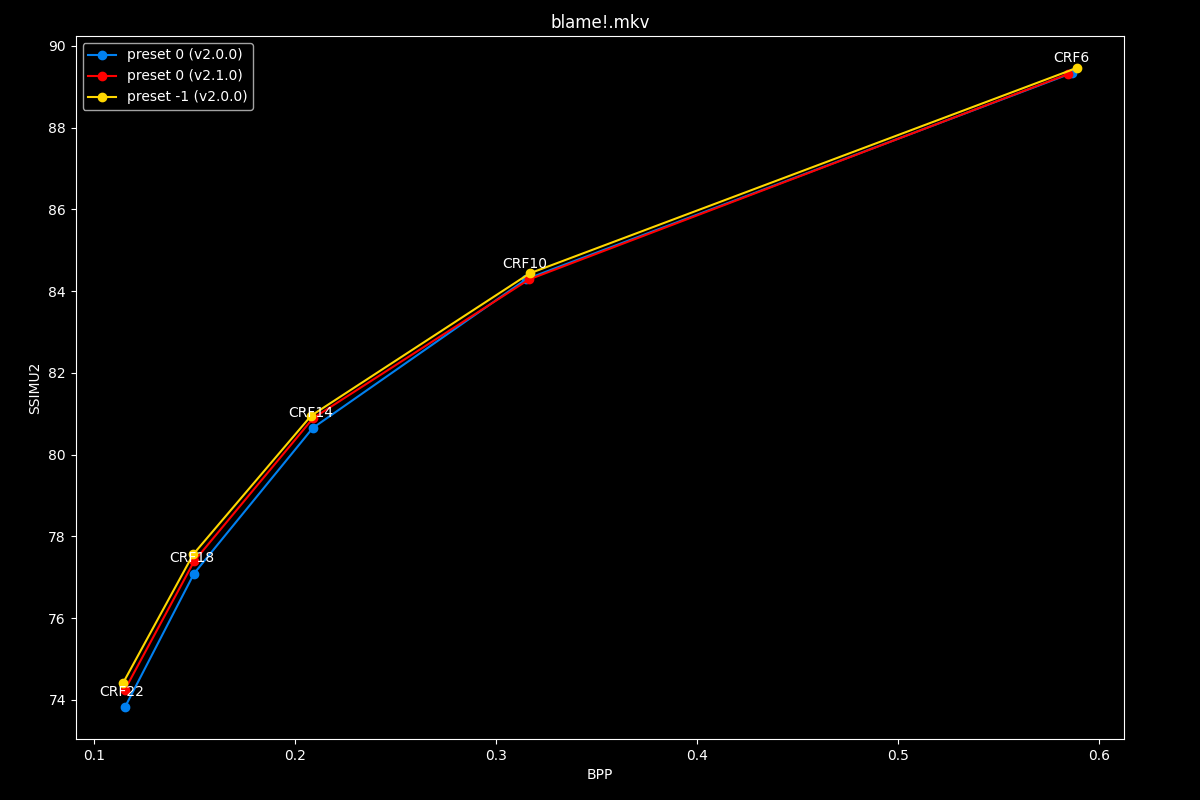
The first image is available above without JavaScript. The complete slide manifest lists every image and alternative description.
- Efficiency graphs, low quality:
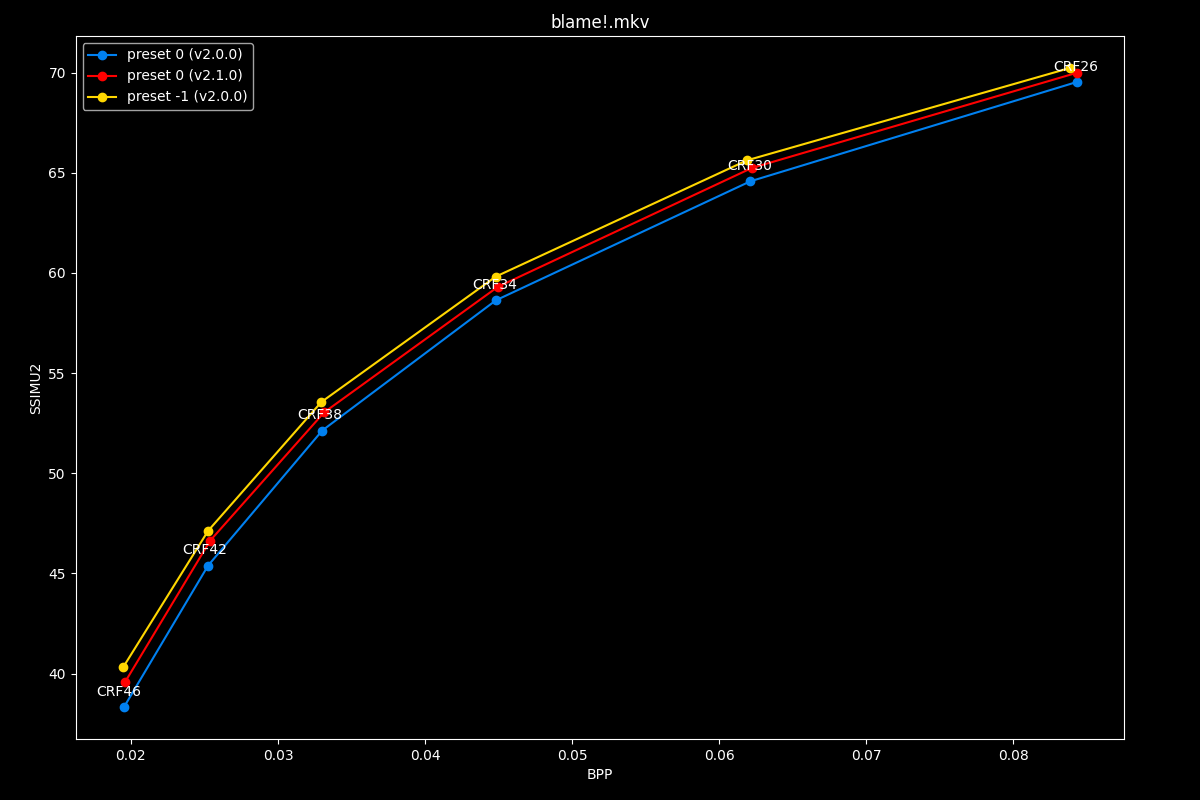
The first image is available above without JavaScript. The complete slide manifest lists every image and alternative description.
Overall, efficiency wise, this new preset 0 places itself in-between old preset -1 and 0
- Speed graphs:
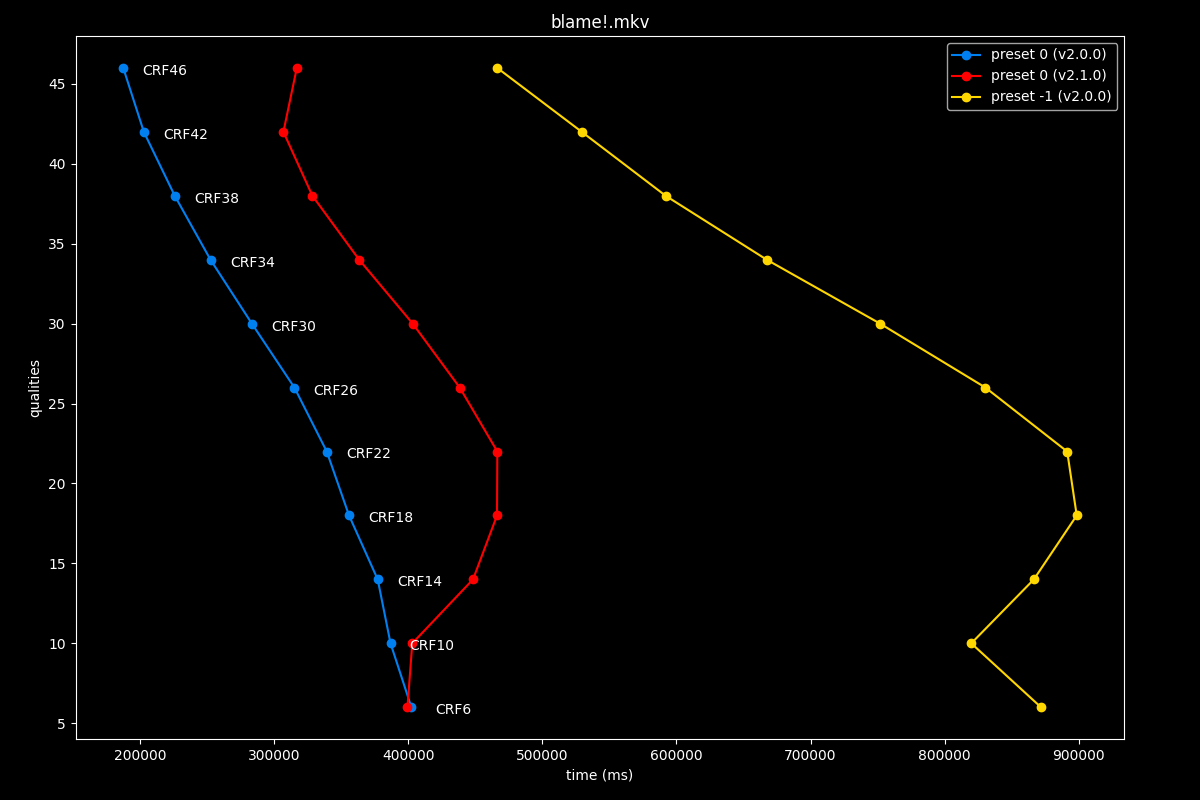
The first image is available above without JavaScript. The complete slide manifest lists every image and alternative description.
Interestingly enough, its speed is much closer to the old preset 0 than to the old preset -1. This means preset 0 was genuinely improved over v2.0.0!
preset 1: v2.0.0 vs v2.1.0
- Efficiency graphs, high quality:
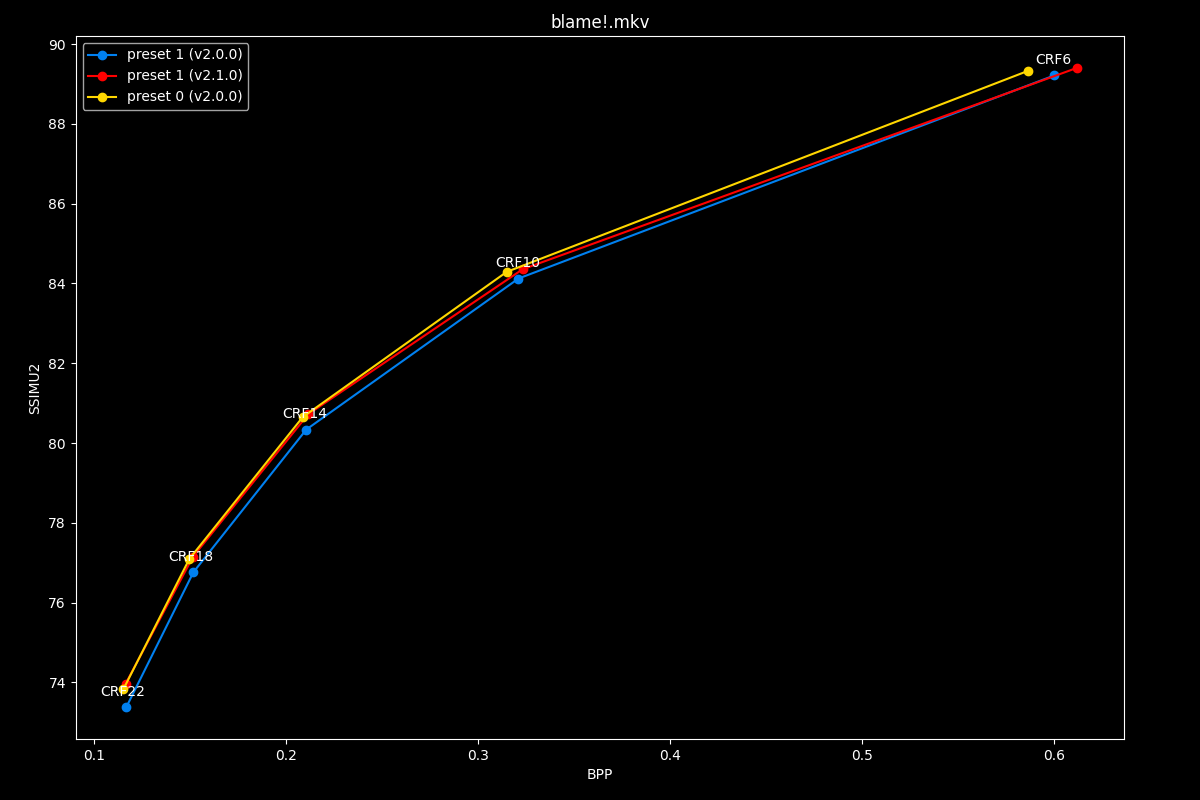
The first image is available above without JavaScript. The complete slide manifest lists every image and alternative description.
- Efficiency graphs, low quality:
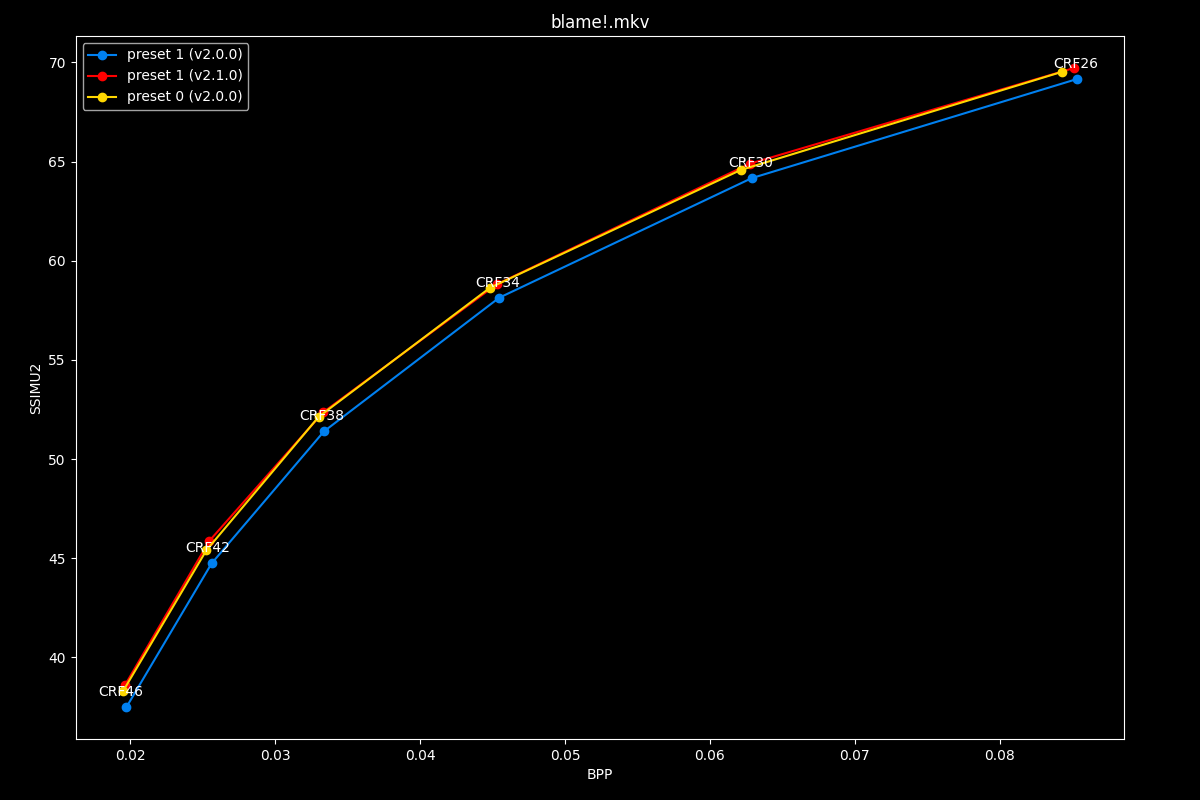
The first image is available above without JavaScript. The complete slide manifest lists every image and alternative description.
In efficiency, this new preset 1 is often equal to old preset 0, else in-between old preset 0 and 1.
- Speed graphs:
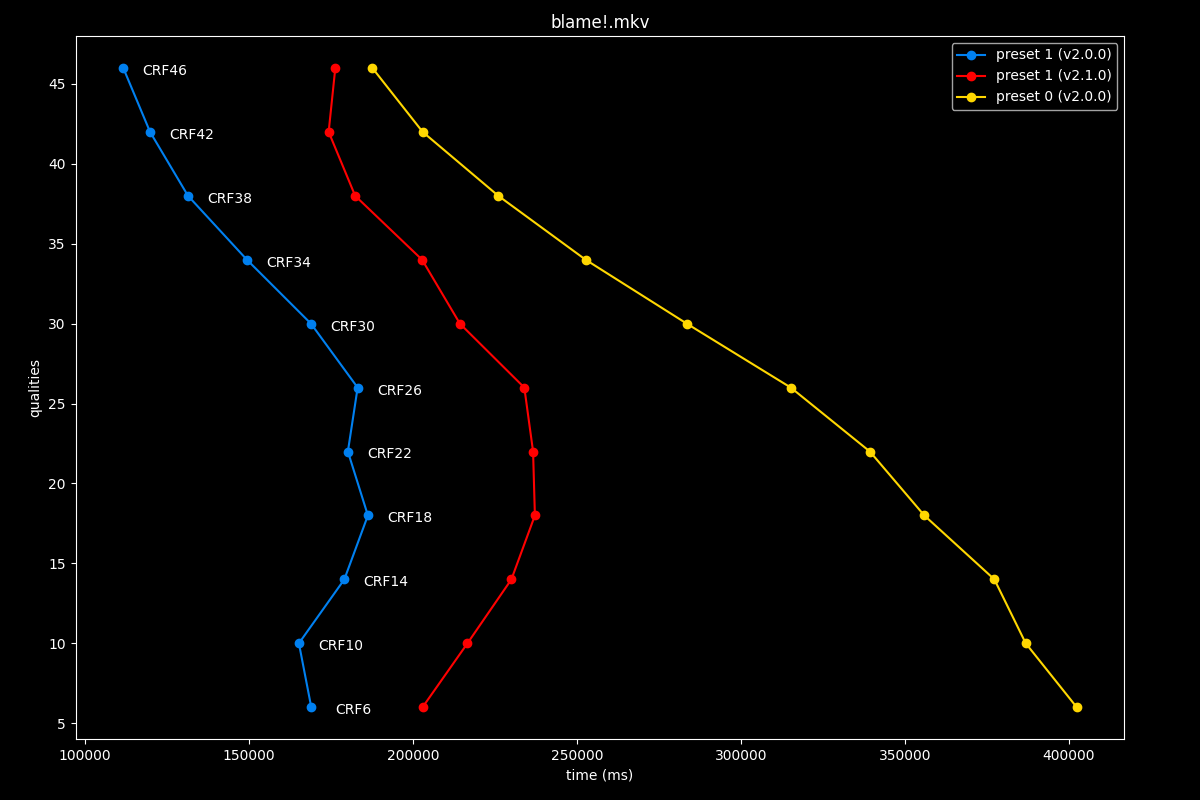
The first image is available above without JavaScript. The complete slide manifest lists every image and alternative description.
We observe that the new preset is a bit closer to old preset 1 speeds than it is to old preset 0 speeds. Good news!
preset 2: v2.0.0 vs v2.1.0
- Efficiency graphs, high quality:
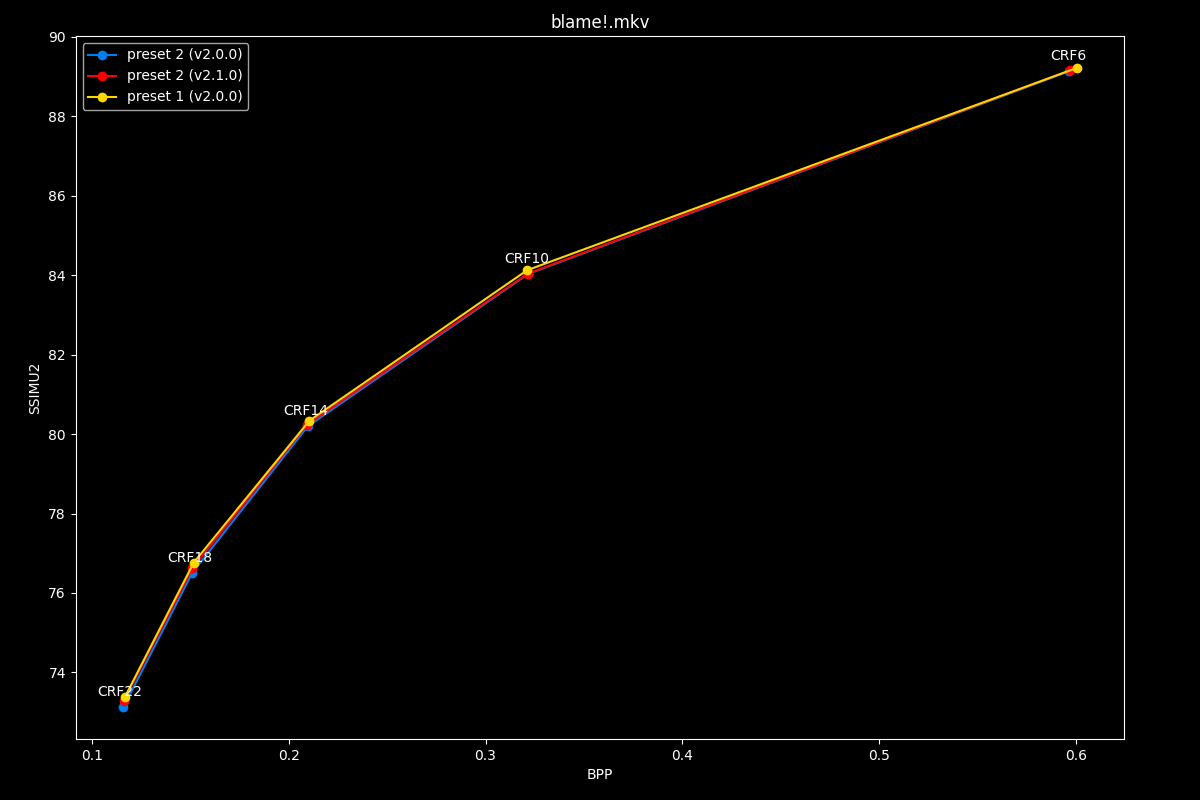
The first image is available above without JavaScript. The complete slide manifest lists every image and alternative description.
- Efficiency graphs, low quality:
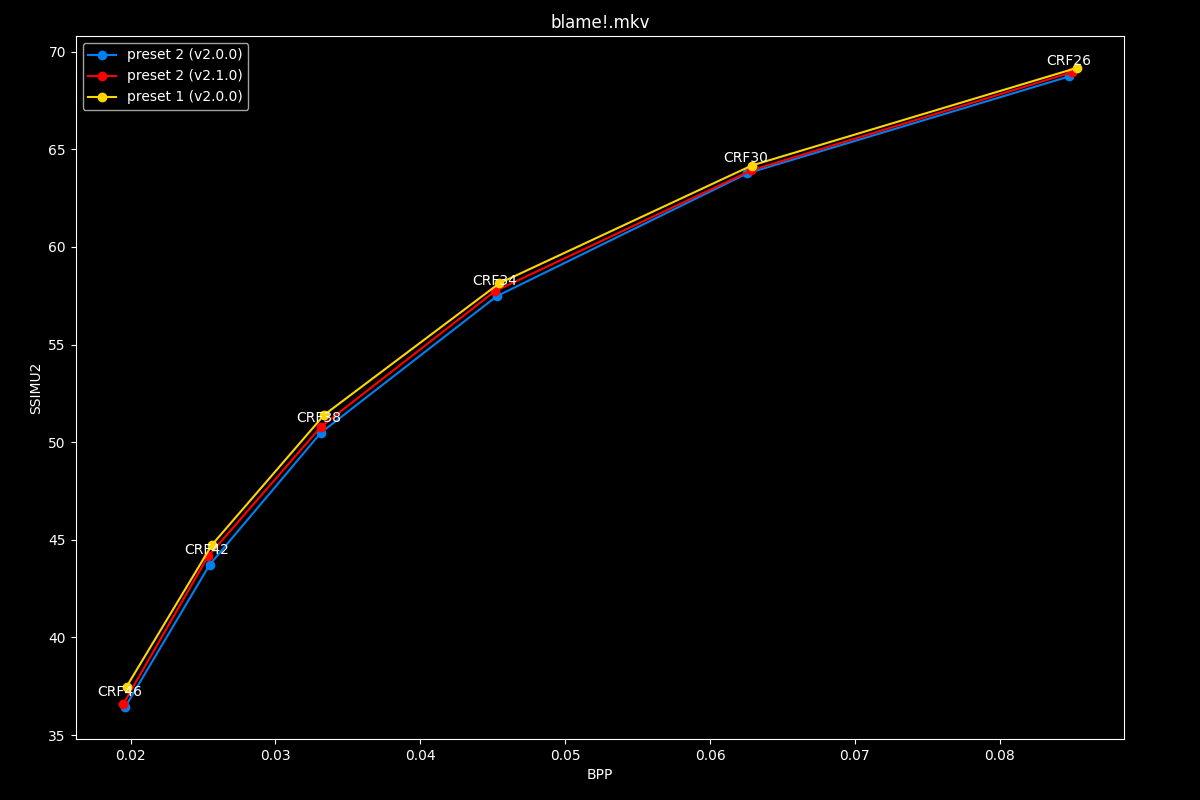
The first image is available above without JavaScript. The complete slide manifest lists every image and alternative description.
Oh well, that’s awkward.
- Speed graphs:
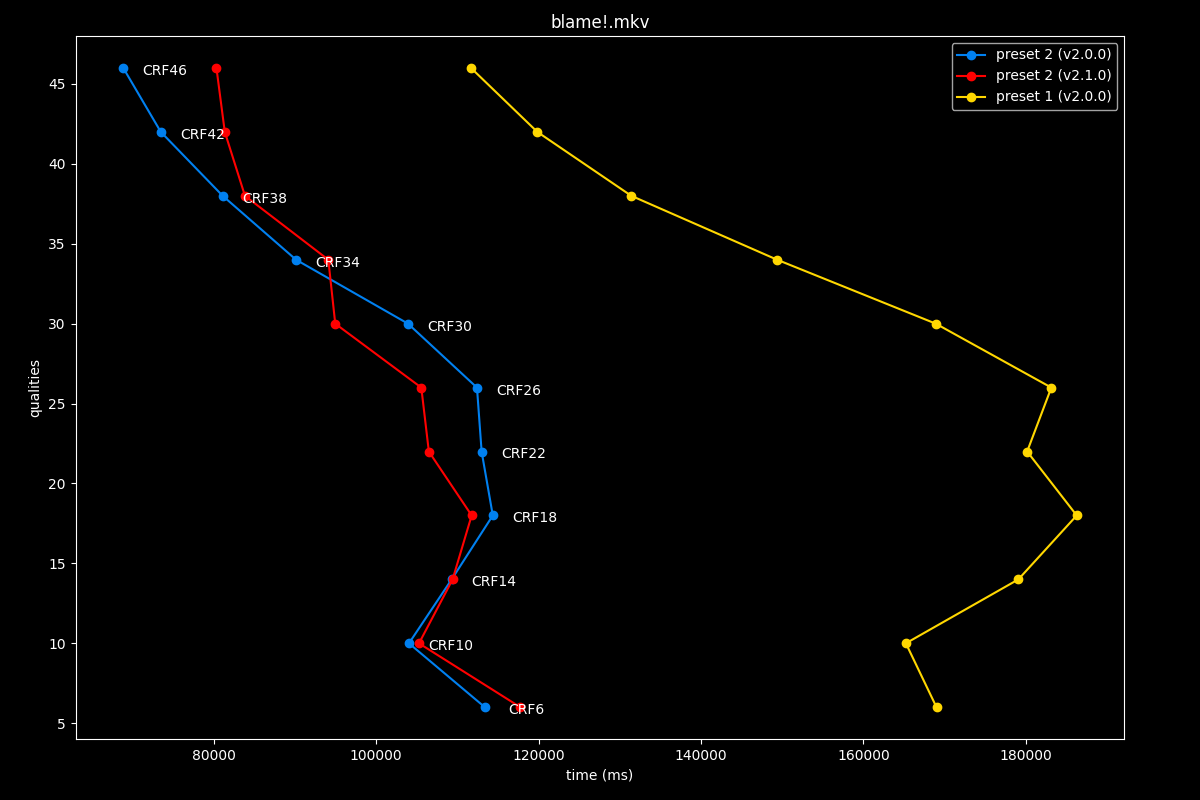
The first image is available above without JavaScript. The complete slide manifest lists every image and alternative description.
Speed was left untouched too, meaning preset 2 is unchanged in v2.1.0.
preset 3: v2.0.0 vs v2.1.0
- Efficiency graphs, high quality:
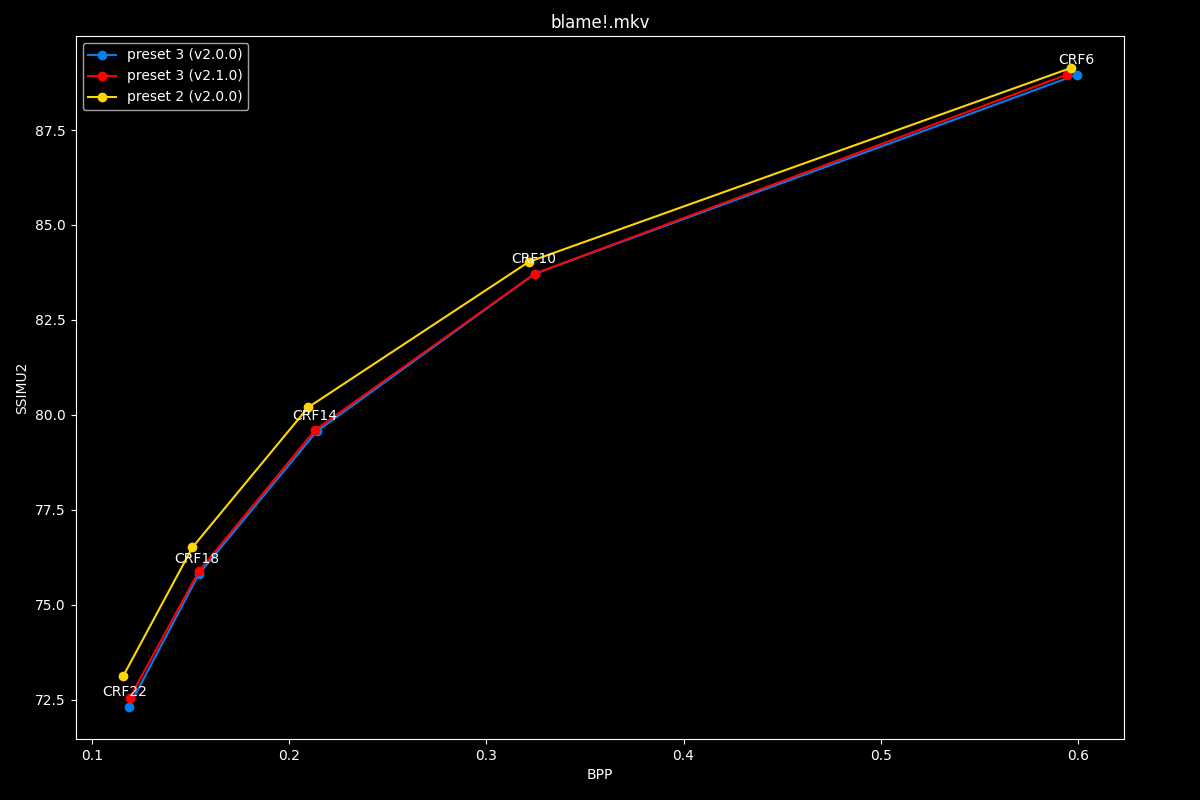
The first image is available above without JavaScript. The complete slide manifest lists every image and alternative description.
- Efficiency graphs, low quality:
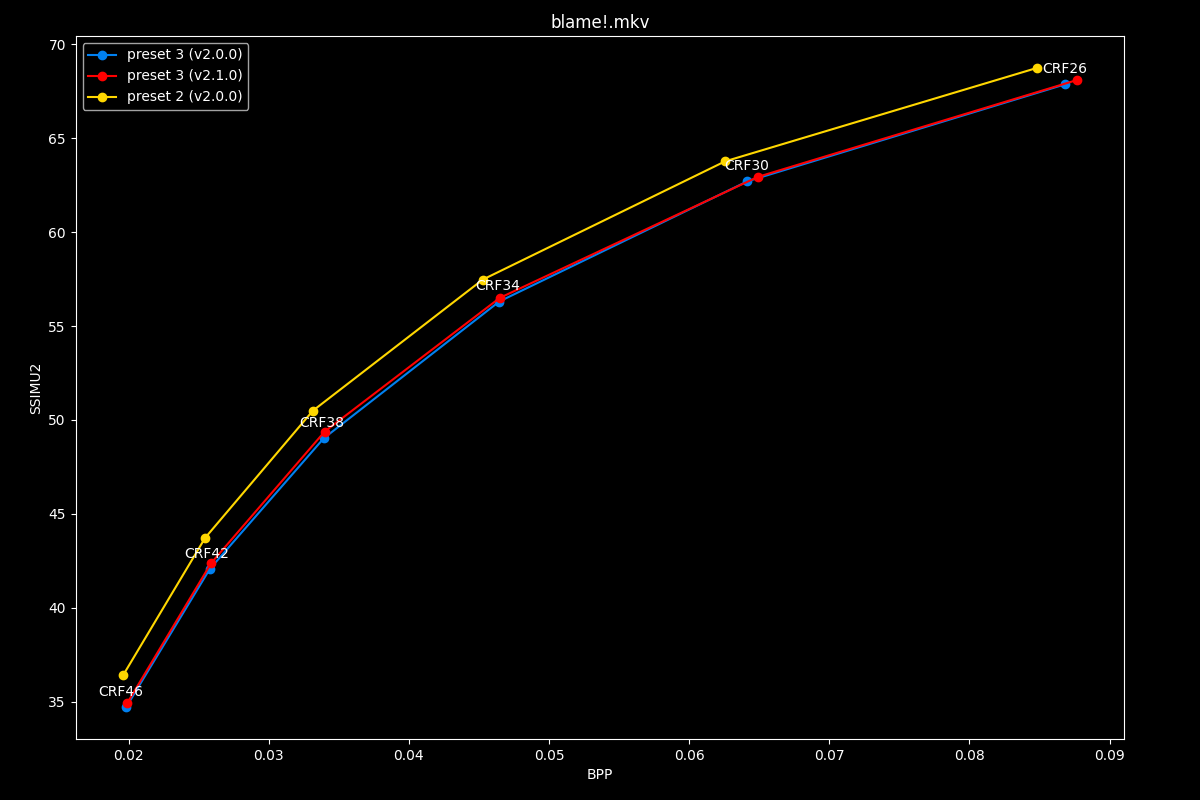
The first image is available above without JavaScript. The complete slide manifest lists every image and alternative description.
The new preset 3’s efficiency is the same as the old one.
- Speed graphs:
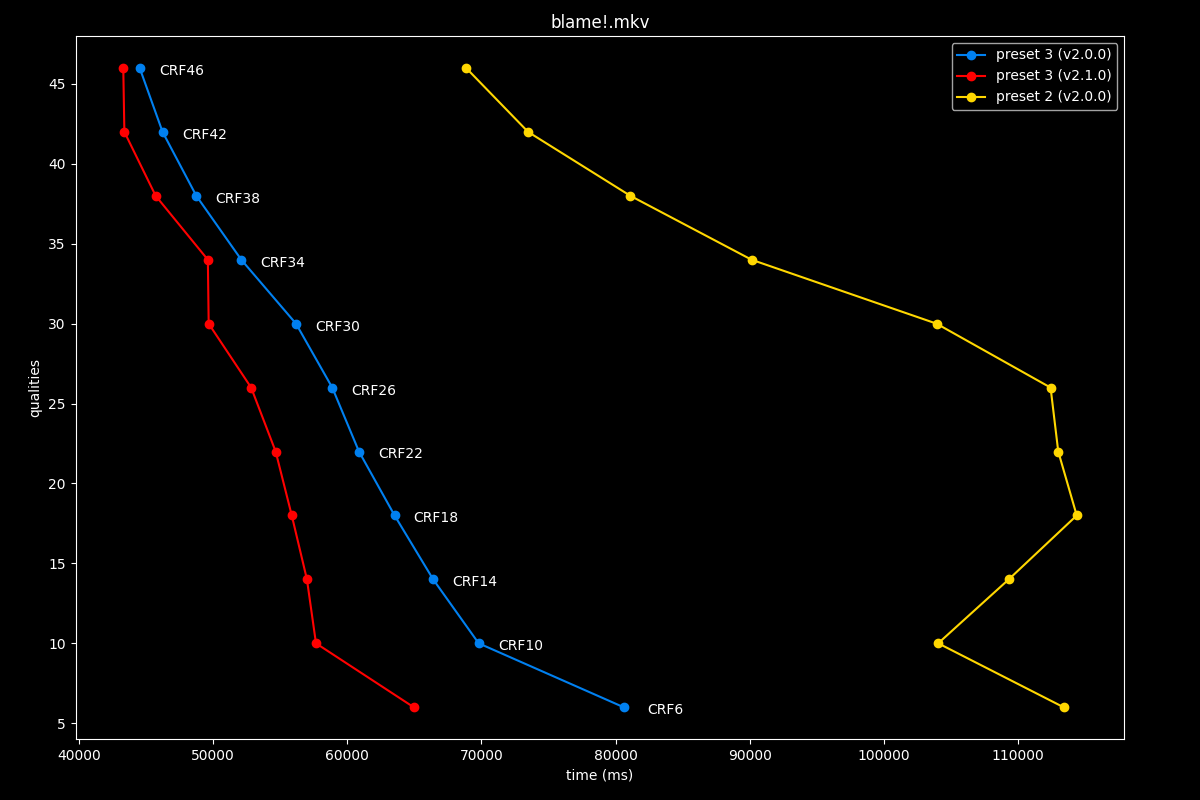
The first image is available above without JavaScript. The complete slide manifest lists every image and alternative description.
However, the preset got slightly faster, so this is a speedup!
preset 4: v2.0.0 vs v2.1.0
- Efficiency graphs, high quality:
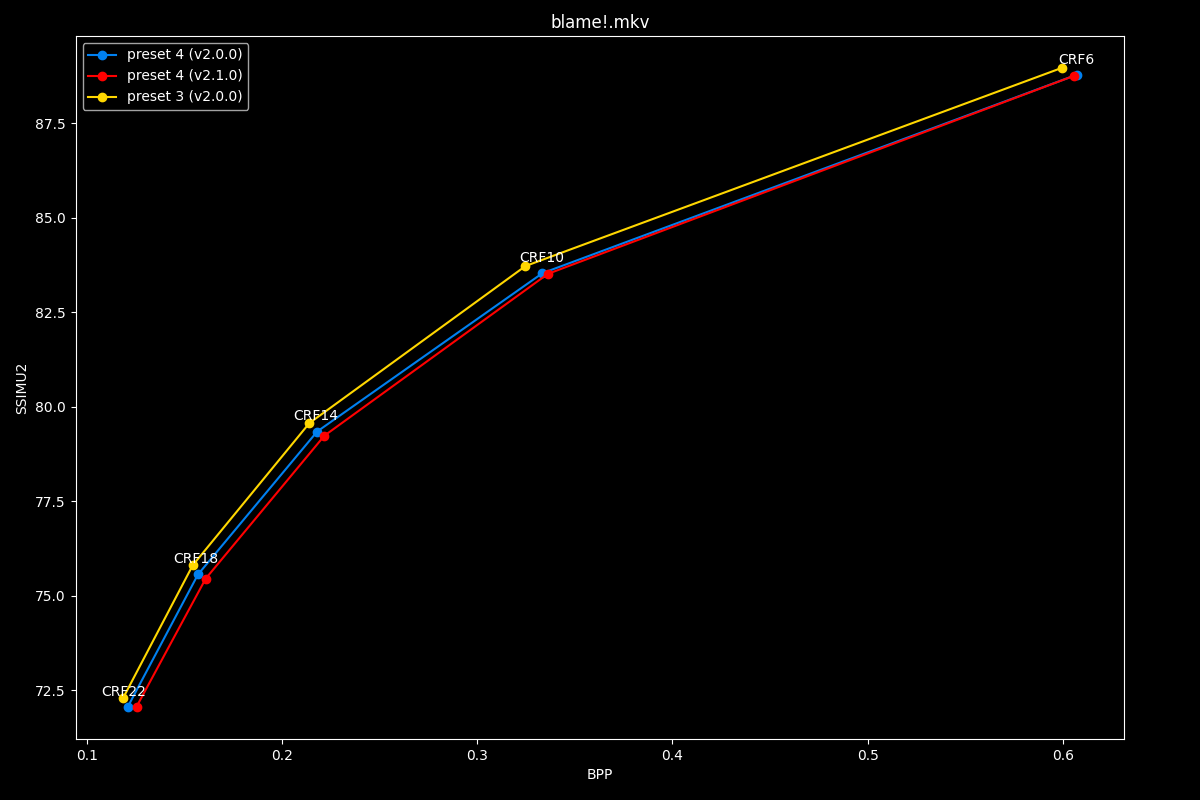
The first image is available above without JavaScript. The complete slide manifest lists every image and alternative description.
- Efficiency graphs, low quality:
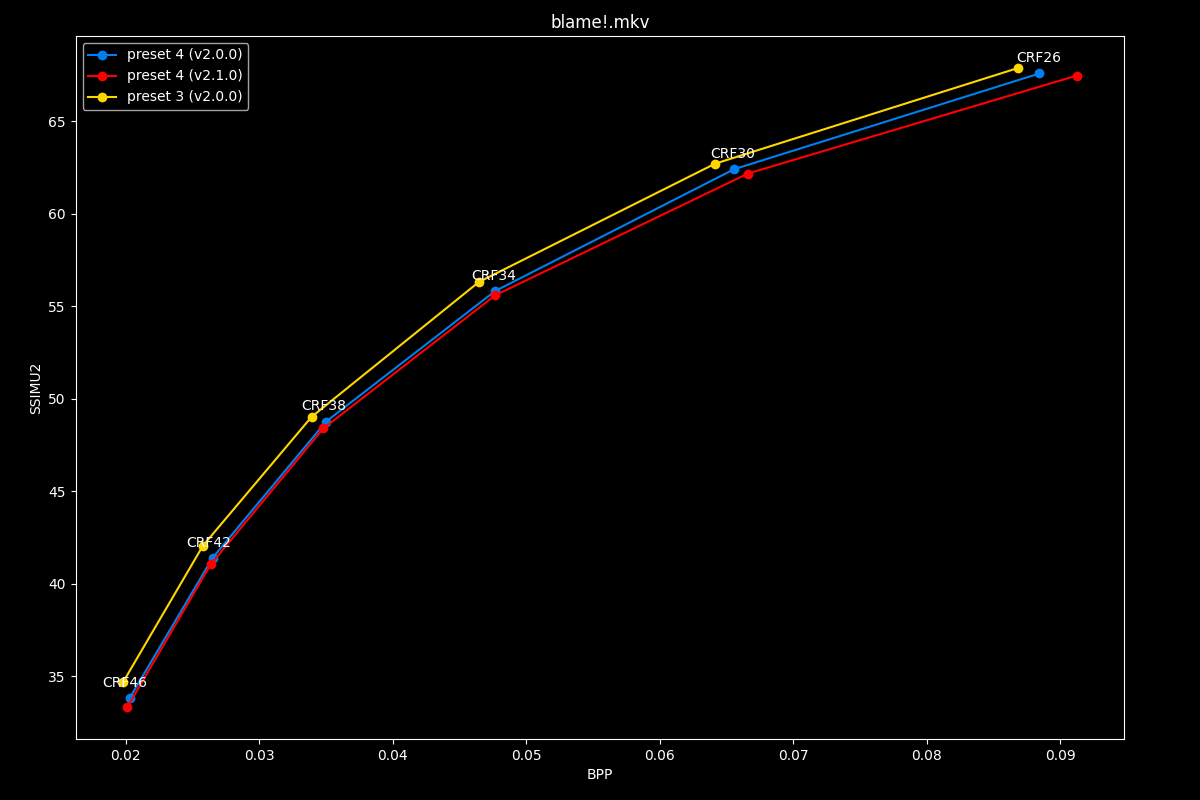
The first image is available above without JavaScript. The complete slide manifest lists every image and alternative description.
We can observe that preset 4 got slightly to moderately worse efficiency wise.
- Speed graphs:
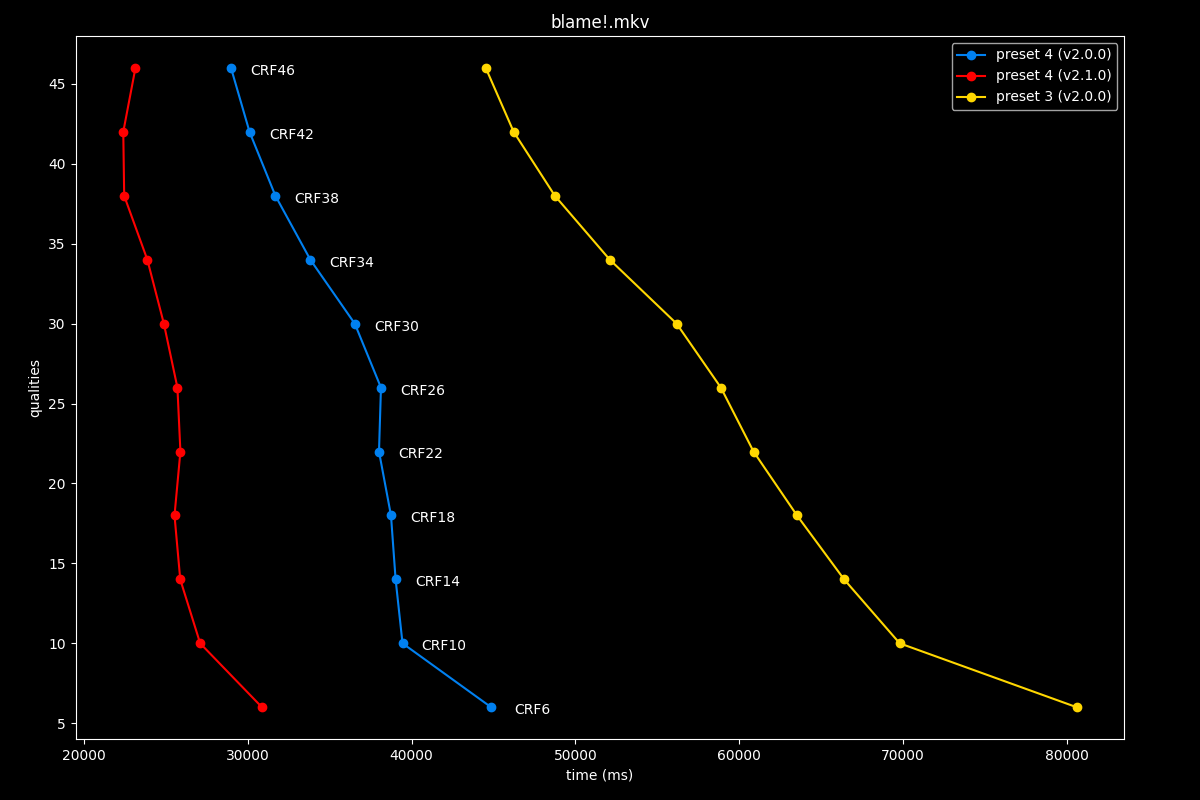
The first image is available above without JavaScript. The complete slide manifest lists every image and alternative description.
Fortunately, the consequence of that slight efficiency decrease is a big performance improvement!
preset 5: v2.0.0 vs v2.1.0
- Efficiency graphs, high quality:
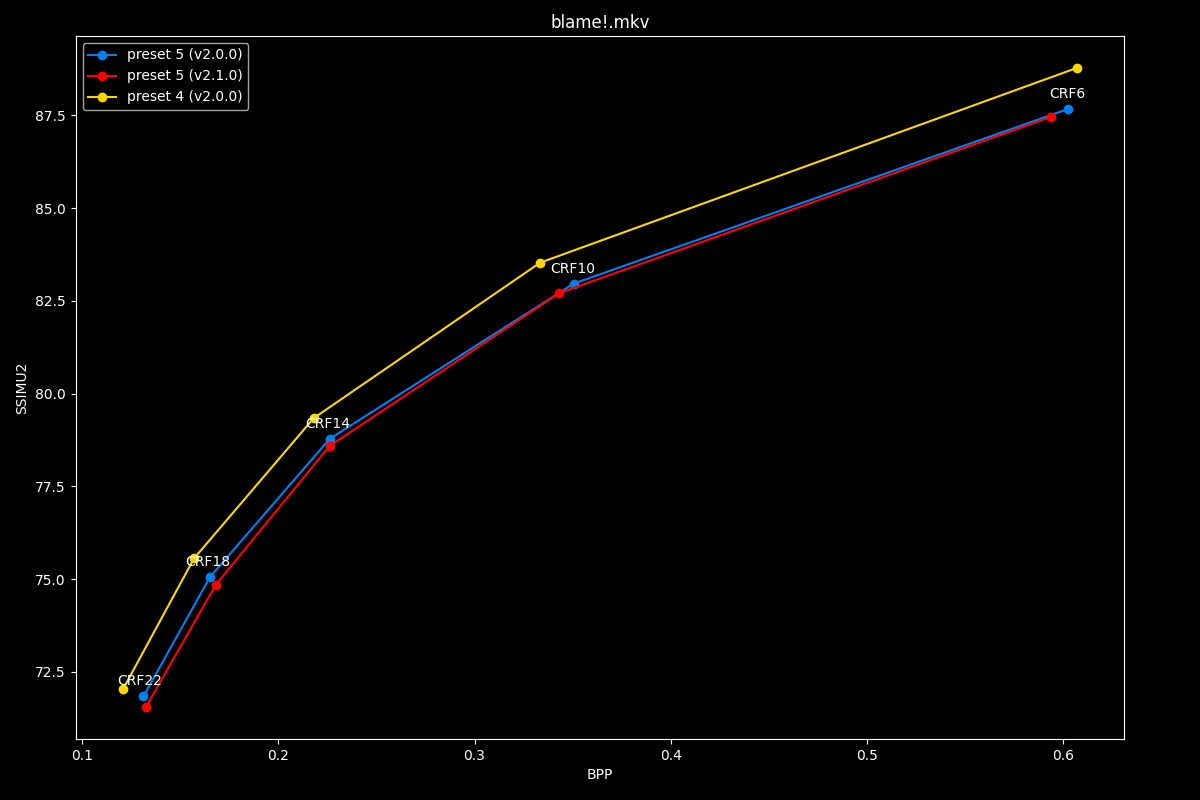
The first image is available above without JavaScript. The complete slide manifest lists every image and alternative description.
- Efficiency graphs, low quality:
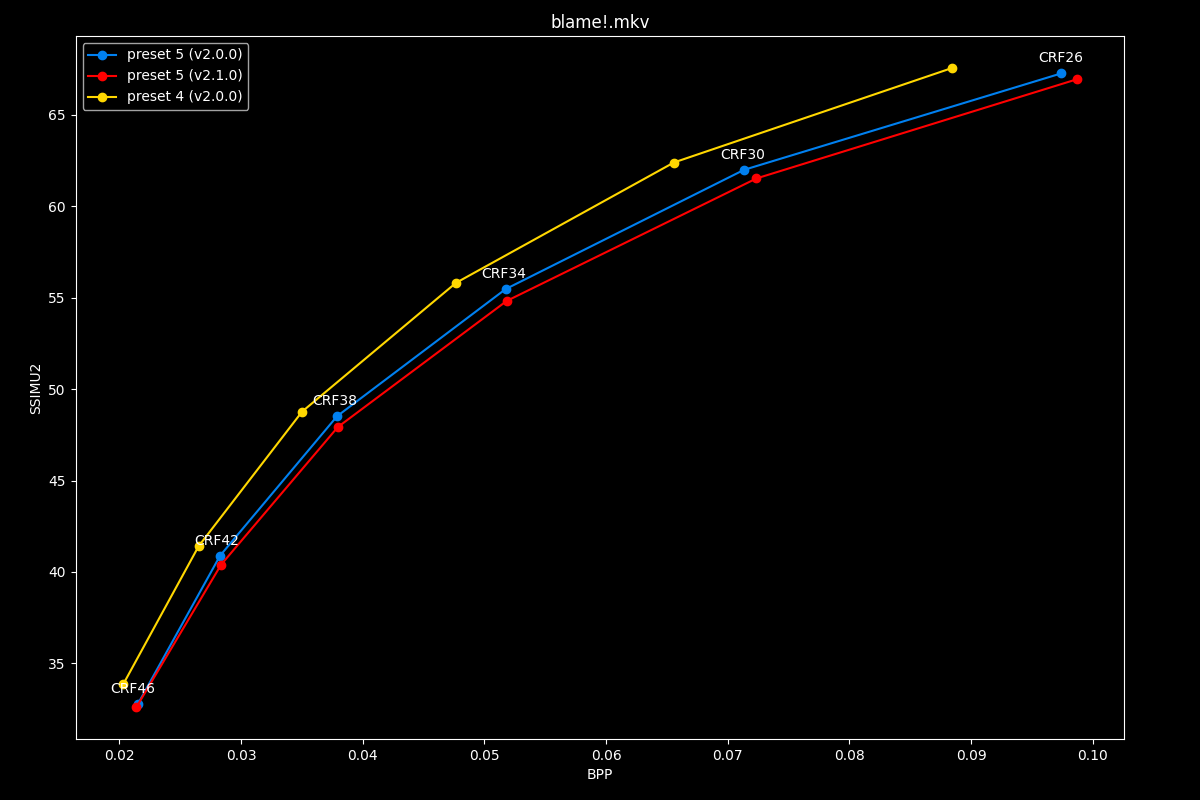
The first image is available above without JavaScript. The complete slide manifest lists every image and alternative description.
Preset 5 seems to have gotten ever so slightly worse efficiency wise.
- Speed graphs:
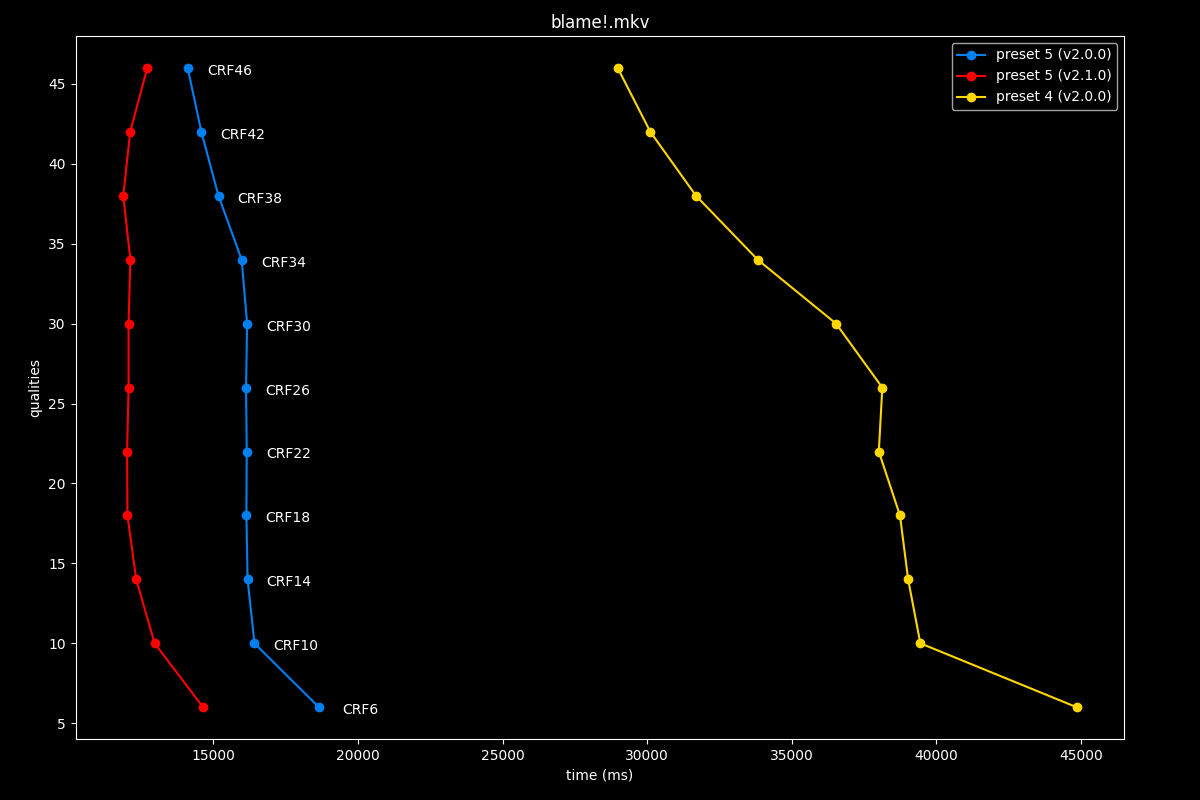
The first image is available above without JavaScript. The complete slide manifest lists every image and alternative description.
Yet it became slightly faster, this is overall a good trade-off.
preset 6: v2.0.0 vs v2.1.0
- Efficiency graphs, high quality:
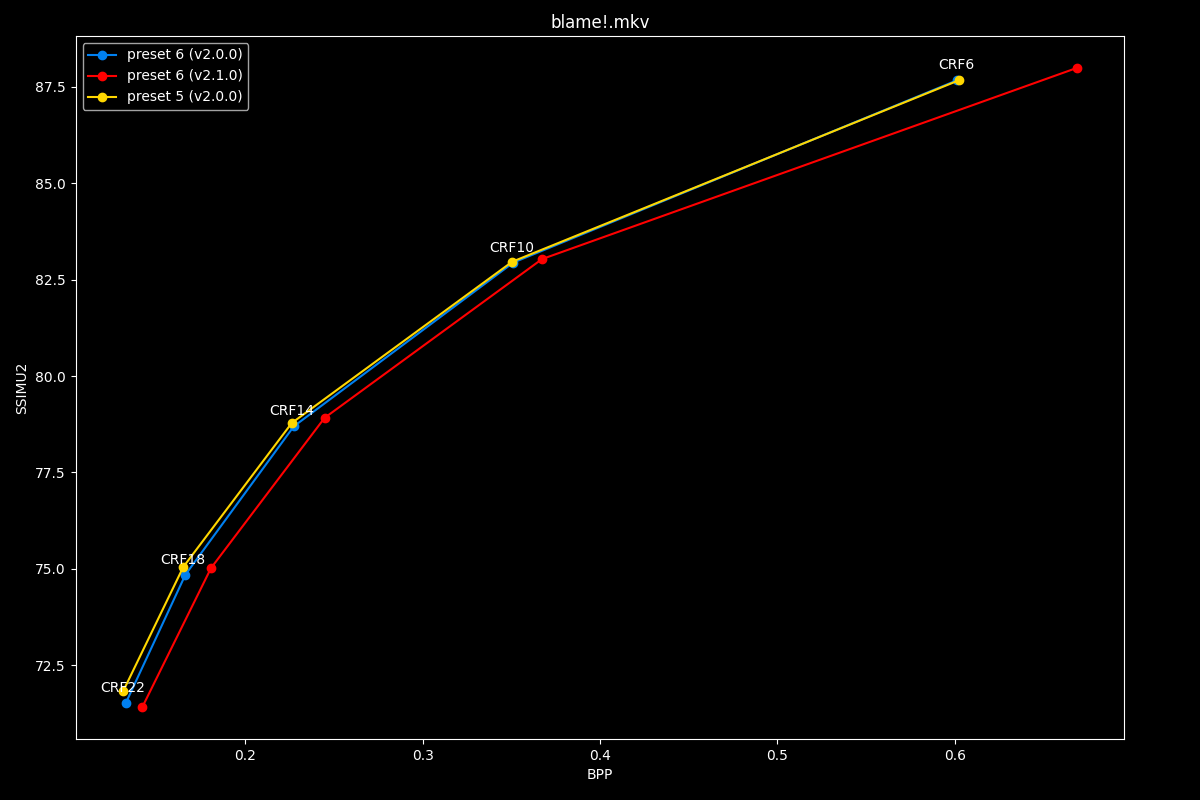
The first image is available above without JavaScript. The complete slide manifest lists every image and alternative description.
- Efficiency graphs, low quality:
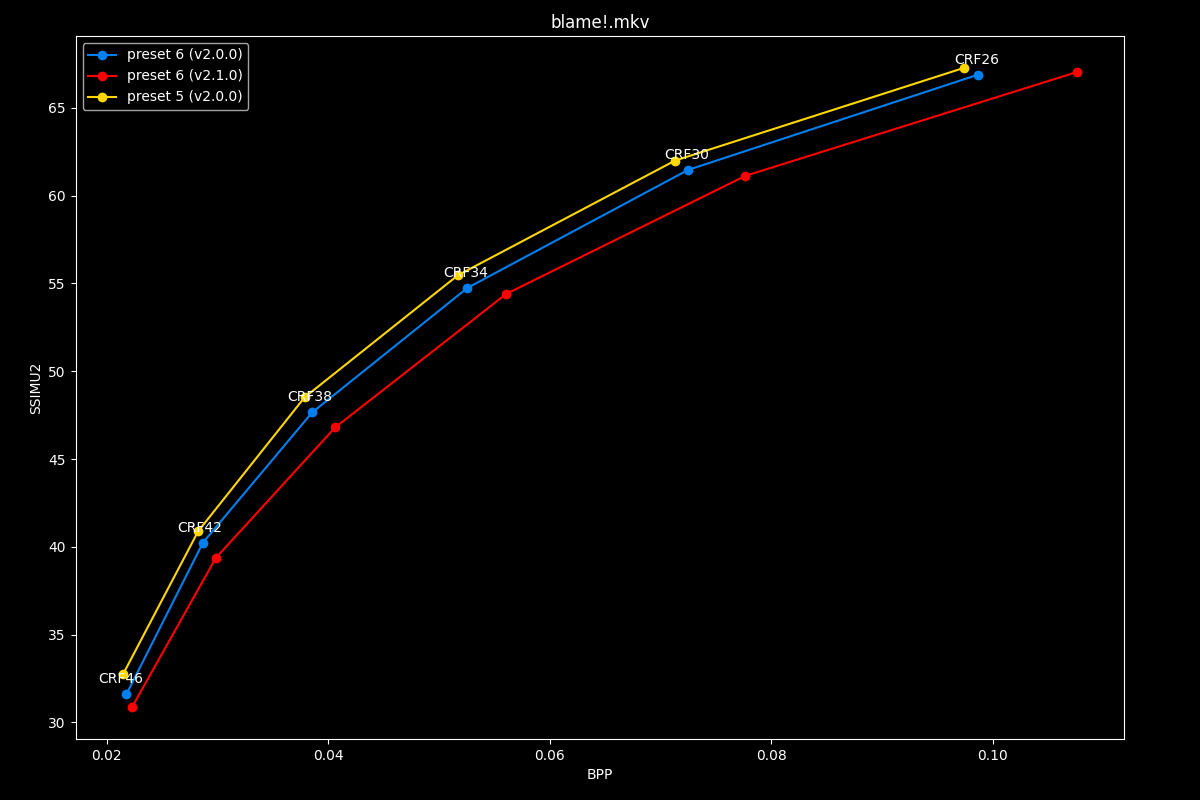
The first image is available above without JavaScript. The complete slide manifest lists every image and alternative description.
The new preset 6 has a huge responsibility: being able to compensate in the absence of its preset 7 sibling. It seems to performs in-between old preset 6 and 7, usually closer to old 7.
- Speed graphs:
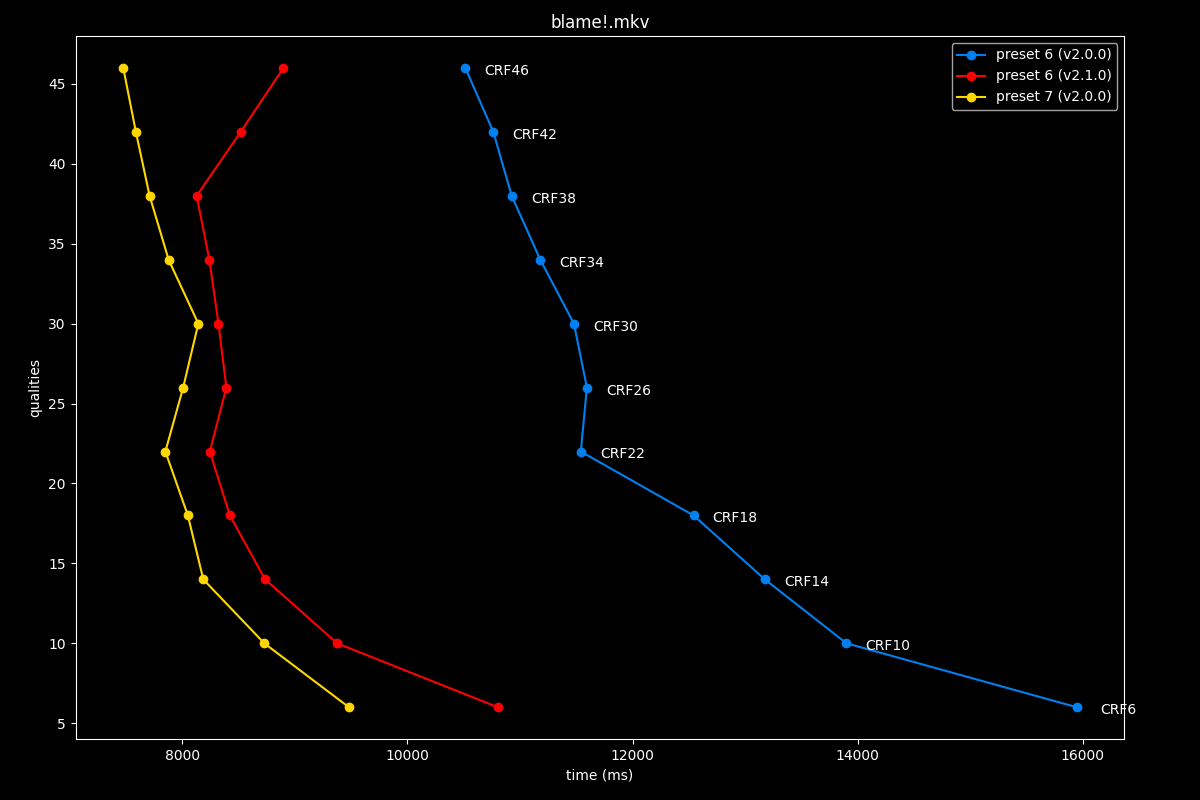
The first image is available above without JavaScript. The complete slide manifest lists every image and alternative description.
Preset 6 is now ever so slightly slower to old 7, this is an interesting trade-off, overall a win over old 7.
preset 7: v2.0.0 vs v2.1.0
Again, there is no preset 7. Actually, it’s preset 6 that disappeared but I’m not remaking the graphs just for fun. If you select preset 6, you will be granted the following message: Svt[warn]: Preset M6 is mapped to M7.
preset 8: v2.0.0 vs v2.1.0
- Efficiency graphs, high quality:
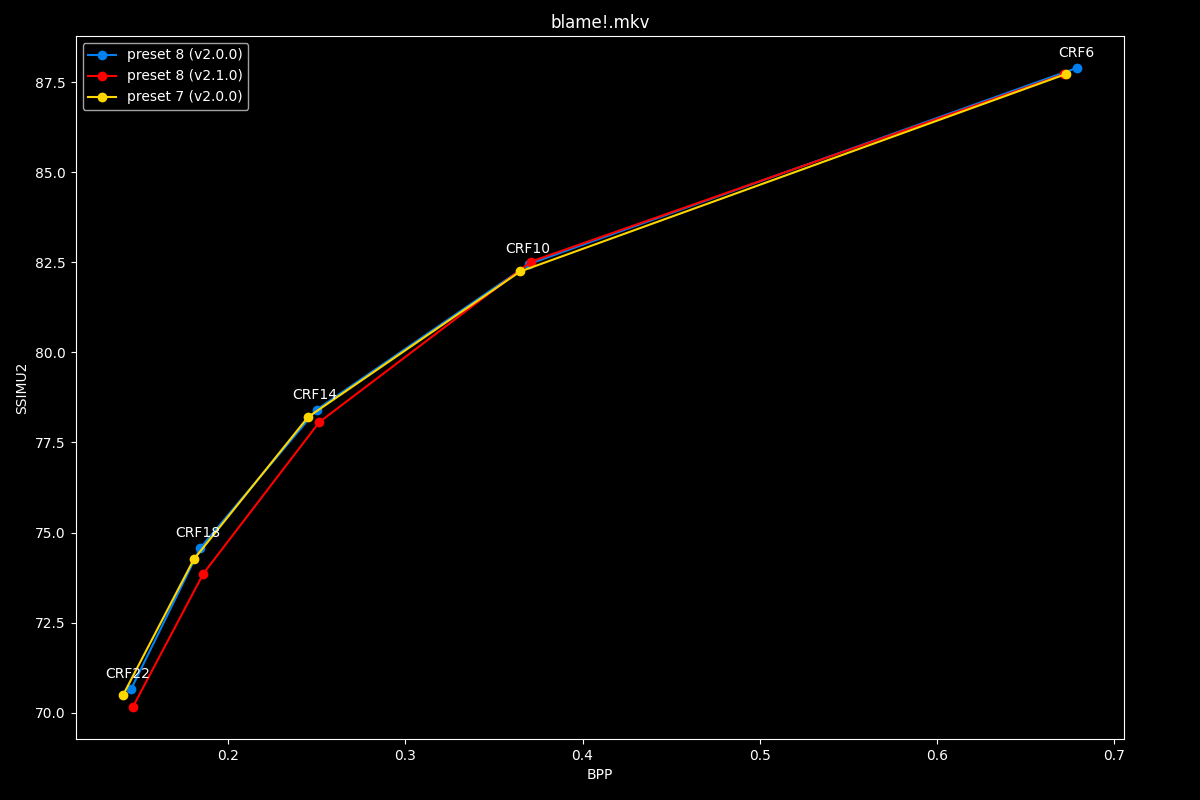
The first image is available above without JavaScript. The complete slide manifest lists every image and alternative description.
- Efficiency graphs, low quality:
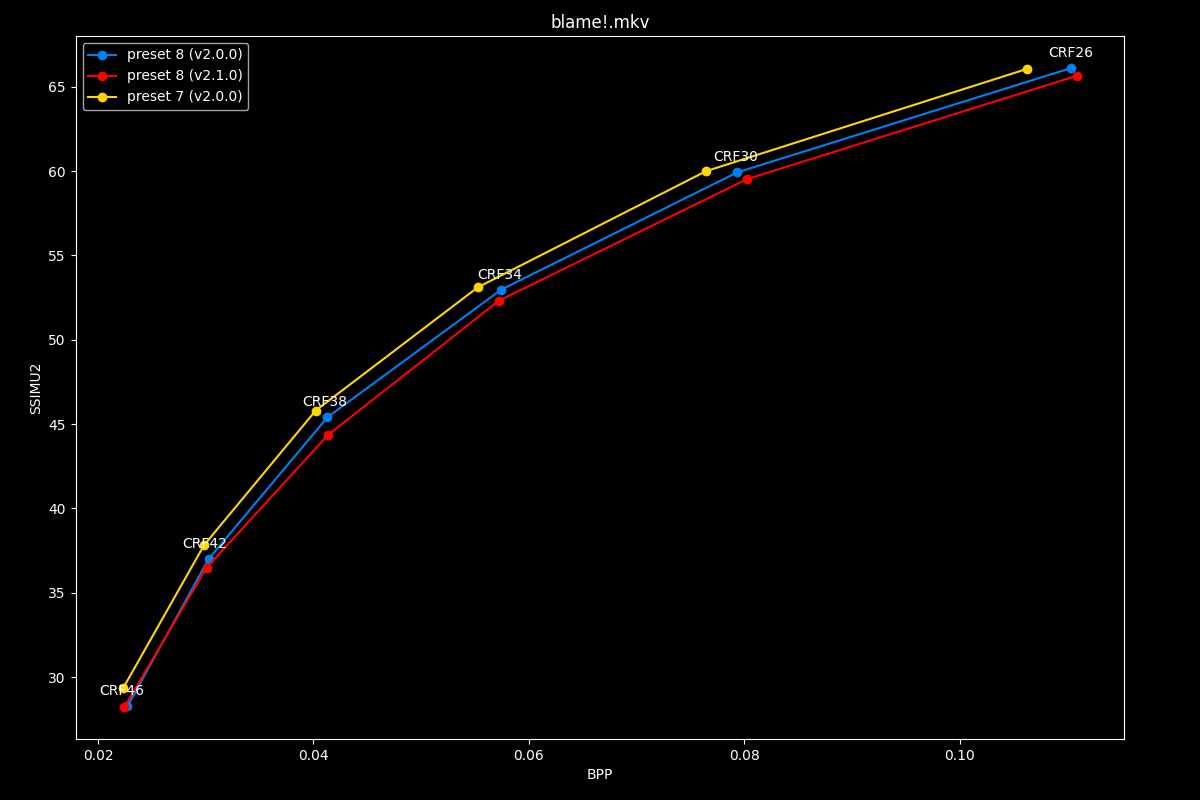
The first image is available above without JavaScript. The complete slide manifest lists every image and alternative description.
In efficiency, this new preset 8 is sometimes equal or slightly worse to the old 8, and sometimes equal or slightly worse than old 7…
- Speed graphs:
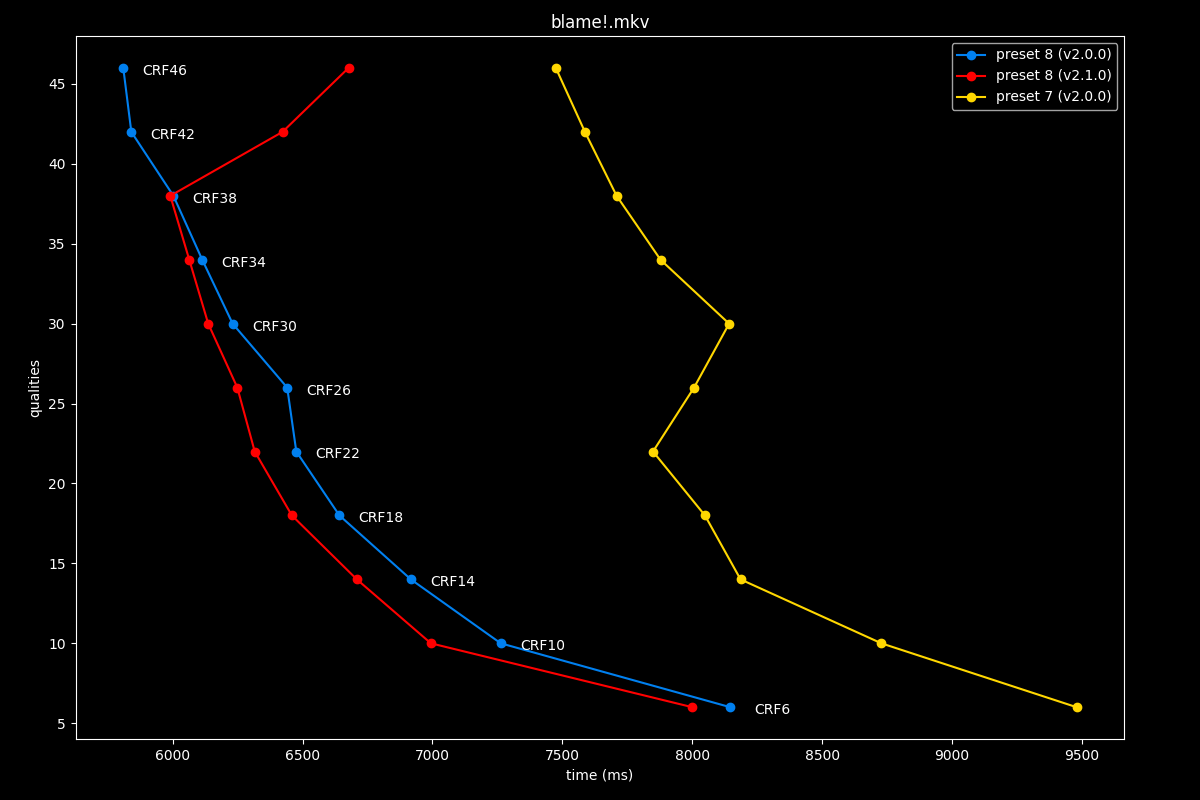
The first image is available above without JavaScript. The complete slide manifest lists every image and alternative description.
Overall, the speed is pretty much unchanged from old 8. It looks like a slight regression, that’s pretty disappointing.
preset 9: v2.0.0 vs v2.1.0
- Efficiency graphs, high quality:
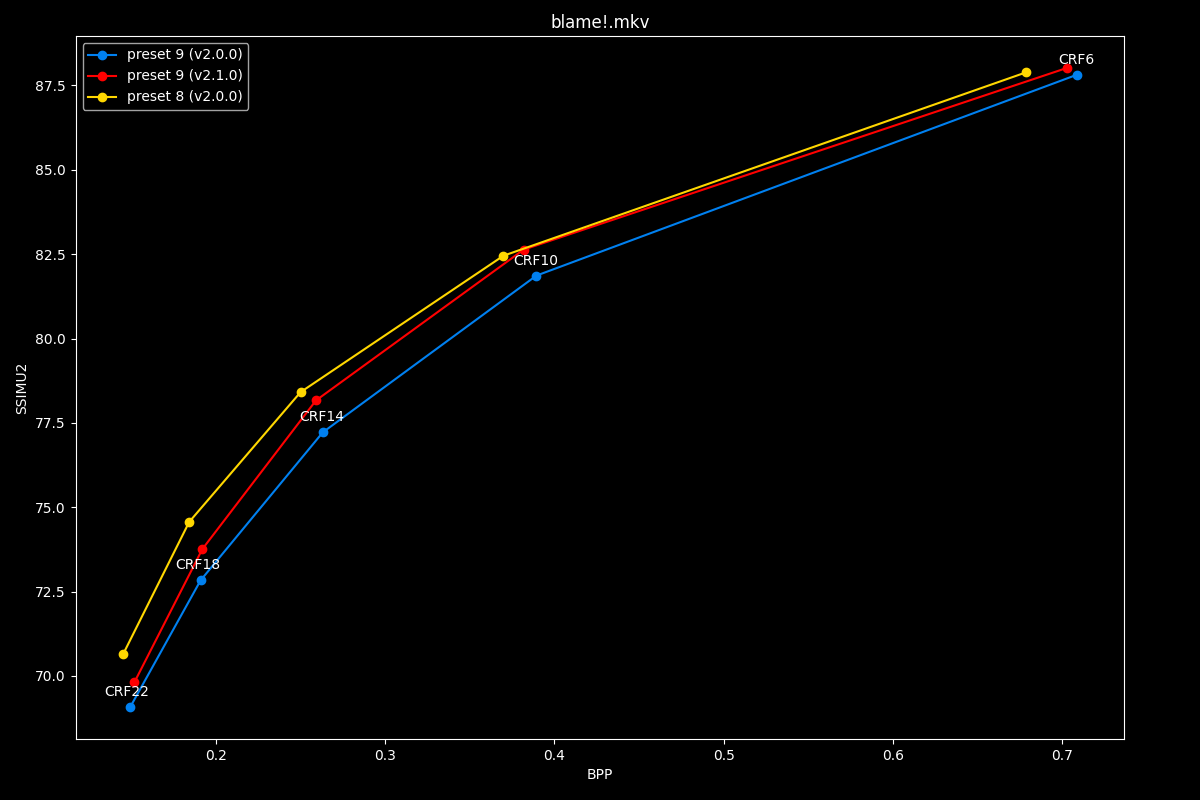
The first image is available above without JavaScript. The complete slide manifest lists every image and alternative description.
- Efficiency graphs, low quality:
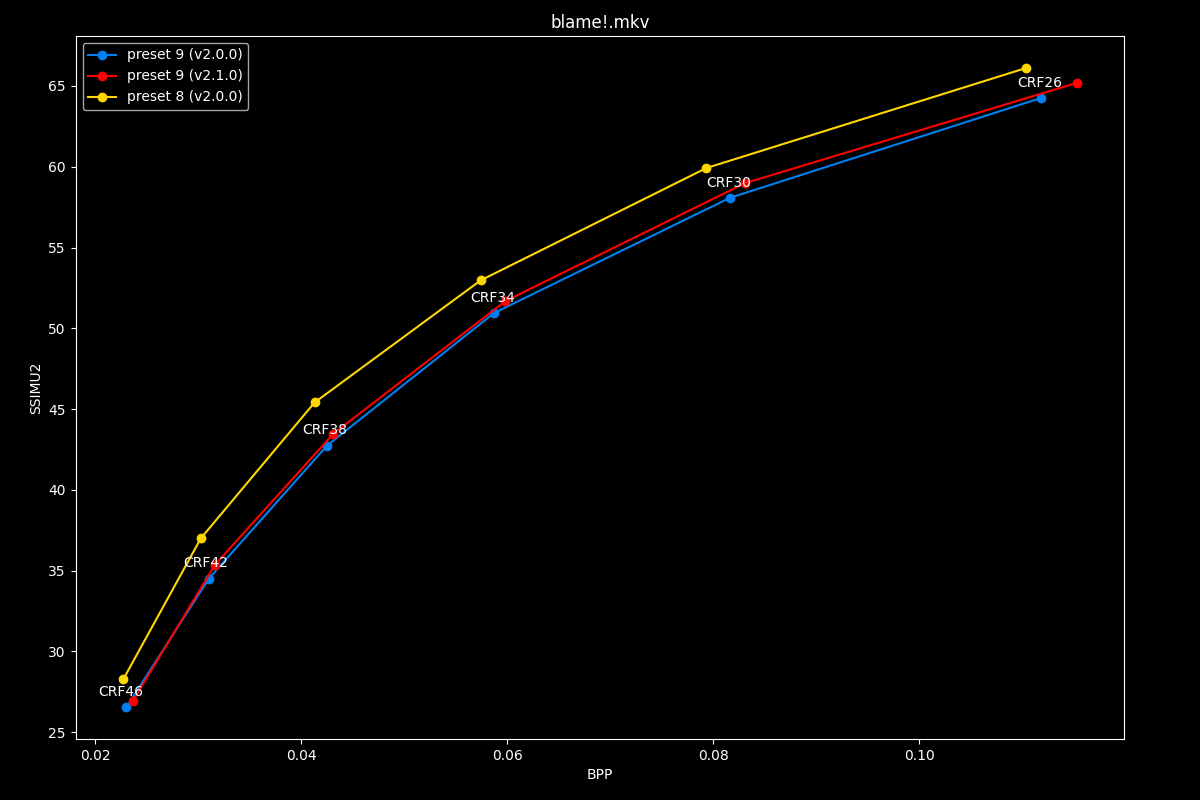
The first image is available above without JavaScript. The complete slide manifest lists every image and alternative description.
The new preset 9 is the same as ever, ever so slightly better in some scenario but nothing groundbreaking.
- Speed graphs:
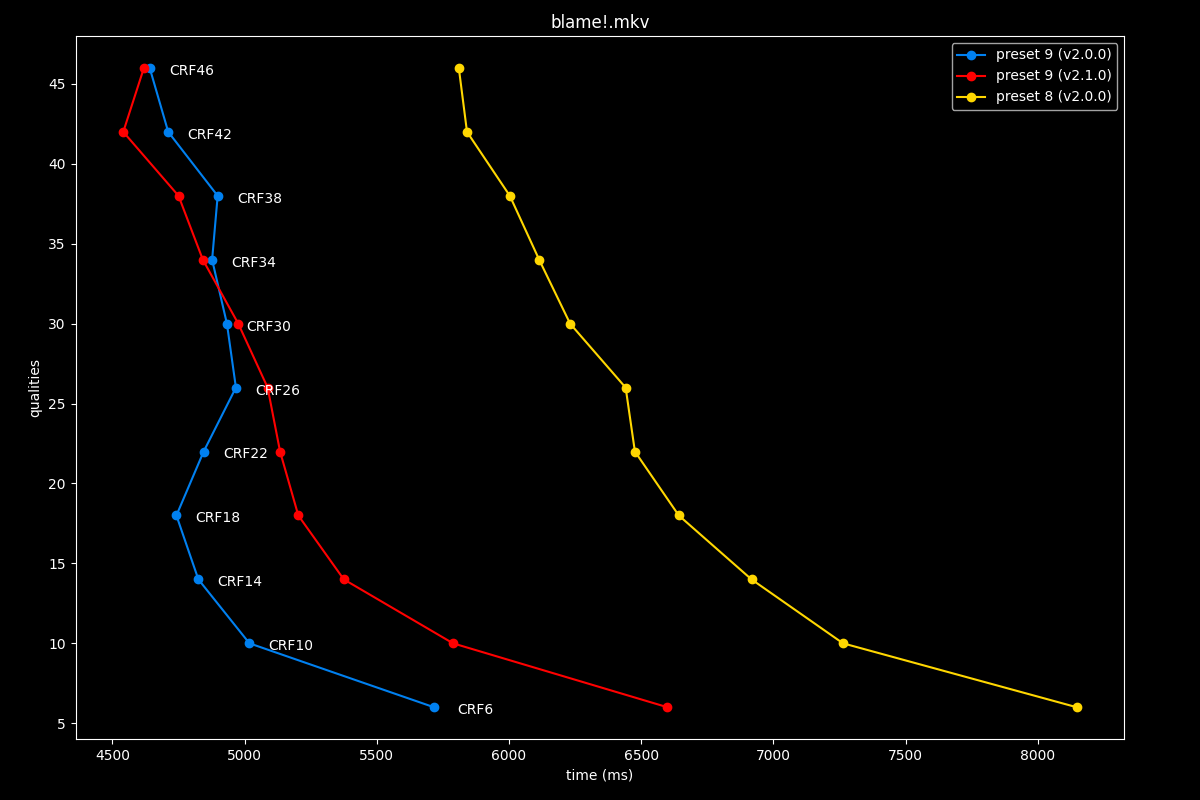
The first image is available above without JavaScript. The complete slide manifest lists every image and alternative description.
Its speed remains the same, sometimes ever so slightly slower. Basically the preset is pretty much unchanged, which may as well be a relief, as the last usable preset of the encoder.
preset 10: v2.0.0 vs v2.1.0
- Efficiency graphs, high quality:
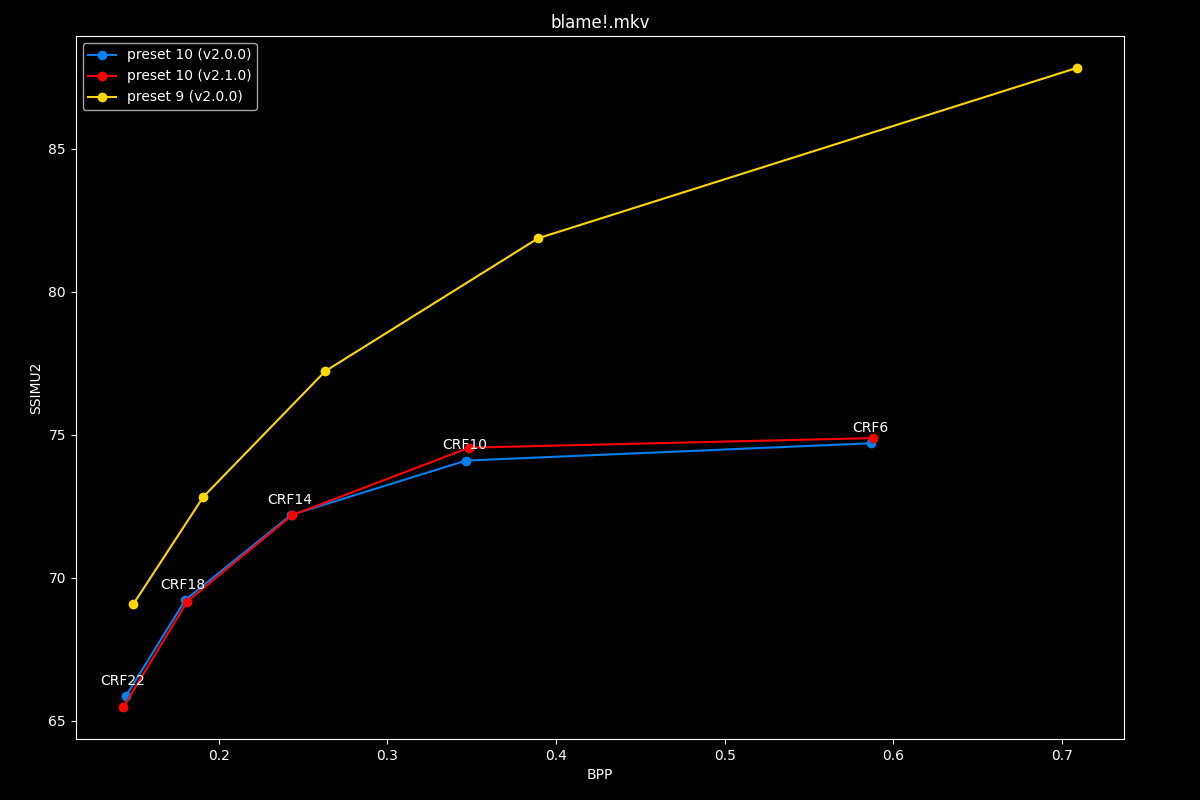
The first image is available above without JavaScript. The complete slide manifest lists every image and alternative description.
- Efficiency graphs, low quality:
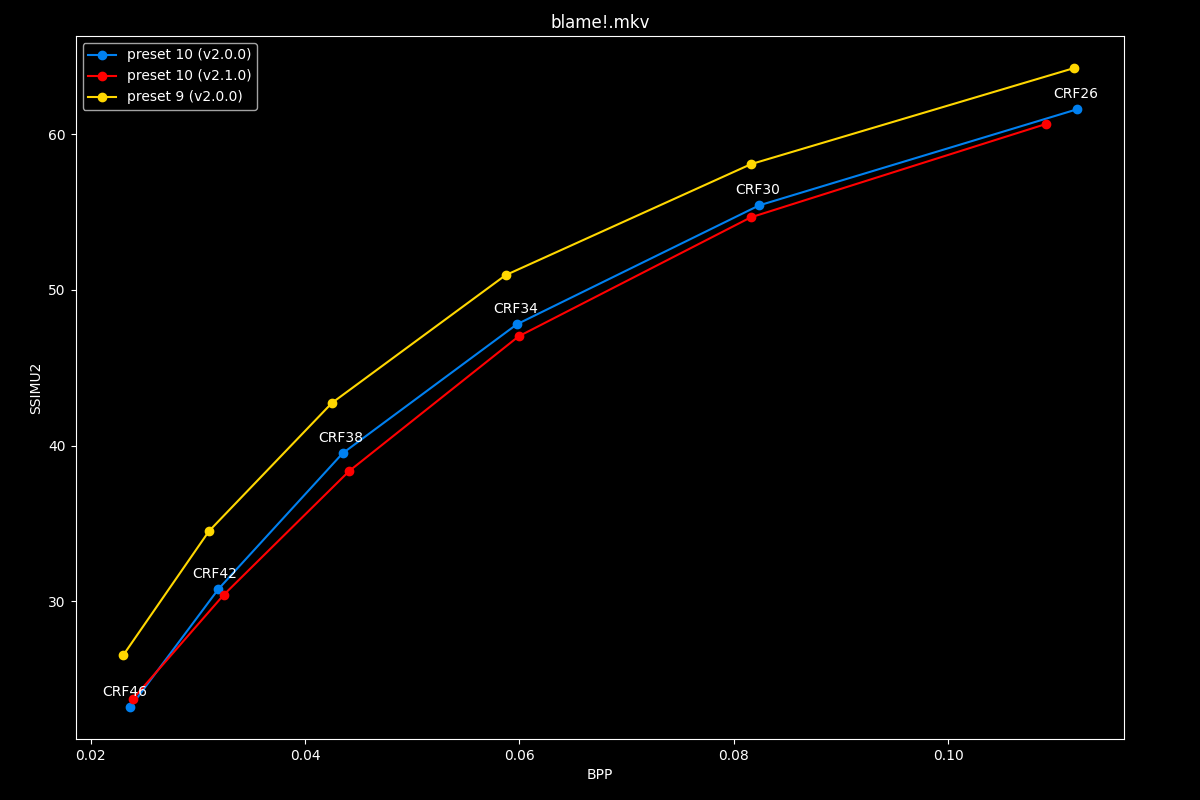
The first image is available above without JavaScript. The complete slide manifest lists every image and alternative description.
Preset 10 is slightly to moderately worse efficiency wise.
- Speed graphs:
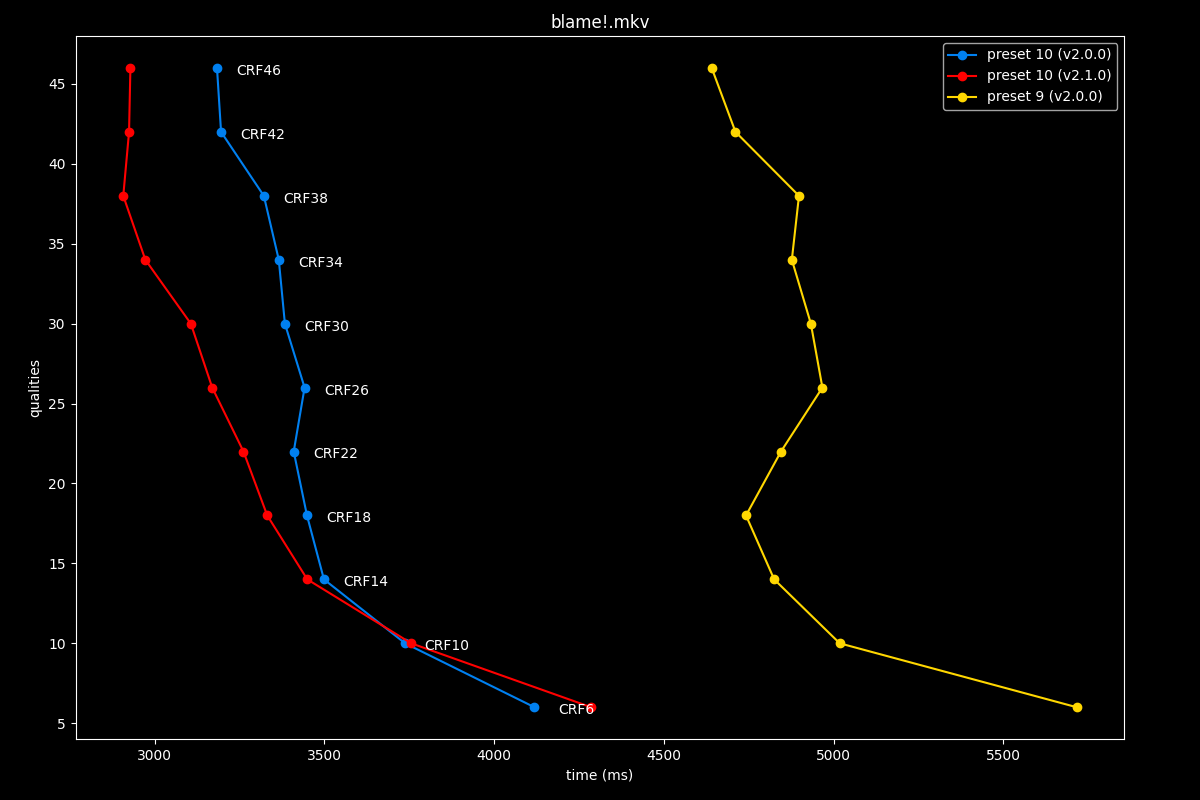
The first image is available above without JavaScript. The complete slide manifest lists every image and alternative description.
Its speed is mostly the same, sometimes ever so slightly faster. It’s a wash, avoid this preset at all costs!
preset 11: v2.0.0 vs v2.1.0
- Efficiency graphs, high quality:
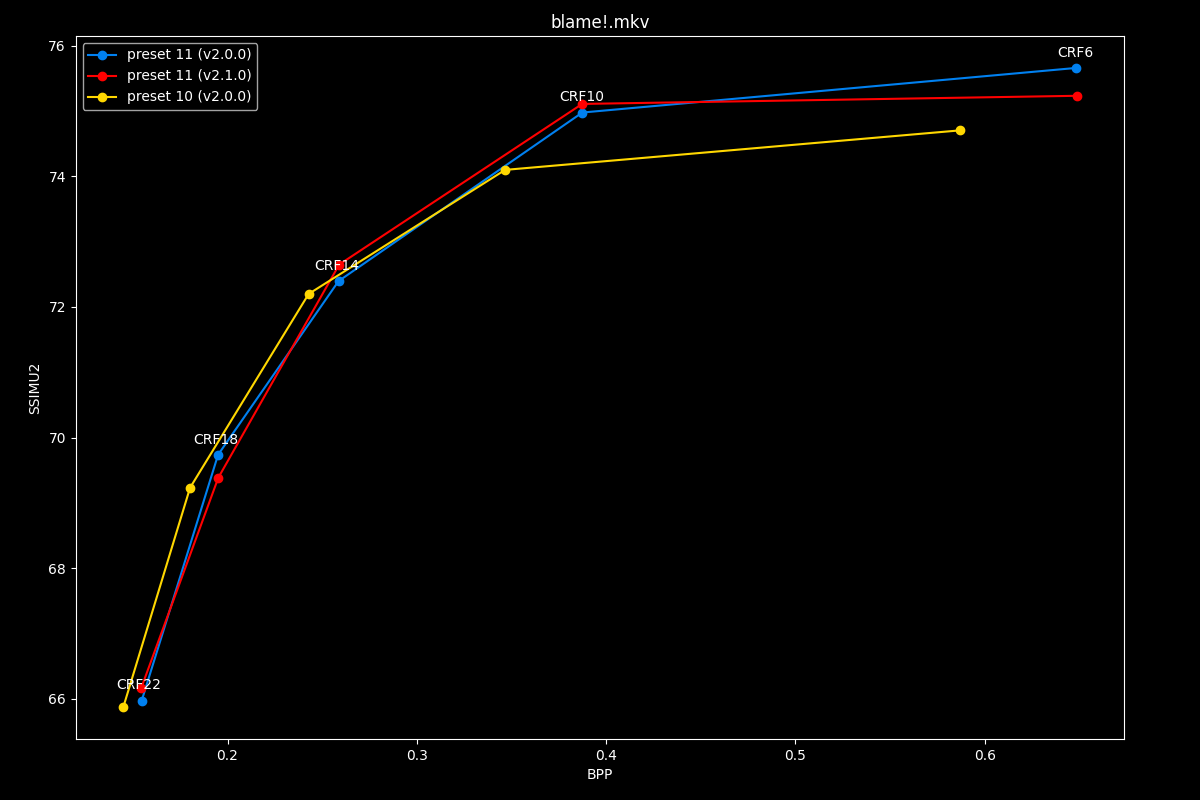
The first image is available above without JavaScript. The complete slide manifest lists every image and alternative description.
- Efficiency graphs, low quality:
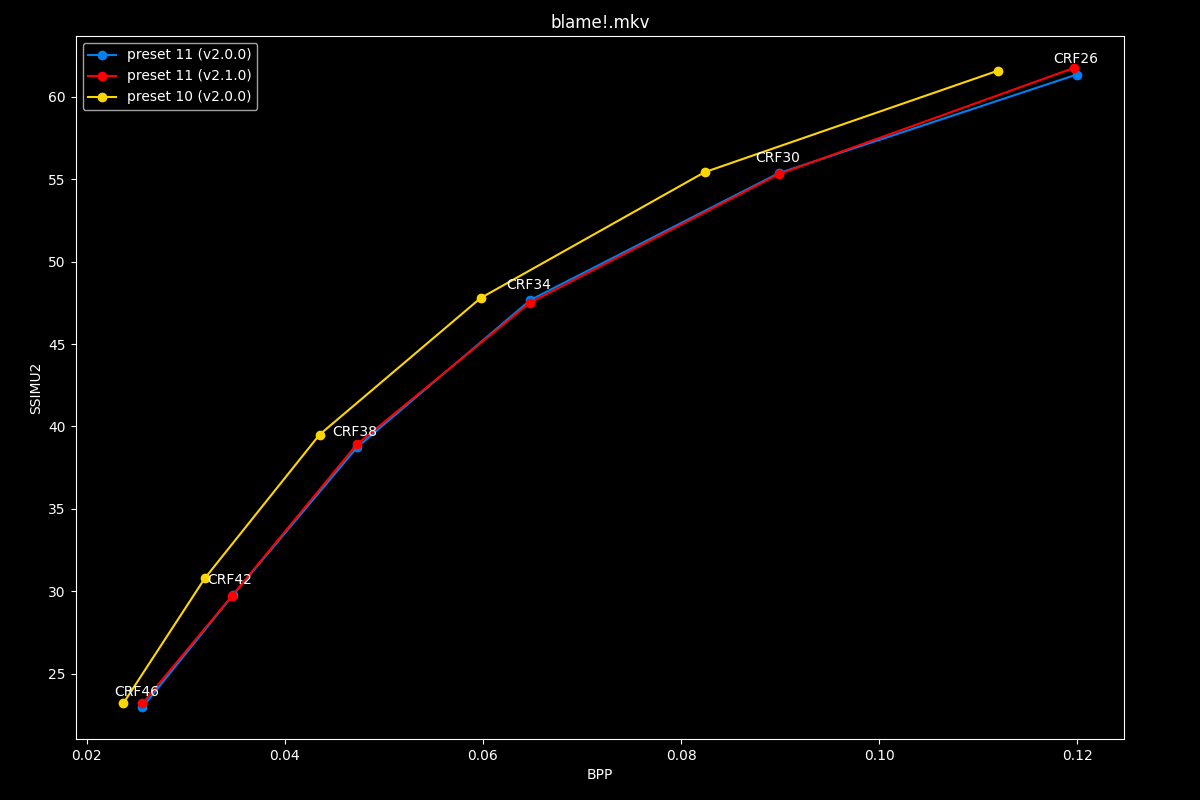
The first image is available above without JavaScript. The complete slide manifest lists every image and alternative description.
Preset 11’s efficiency is untouched.
- Speed graphs:
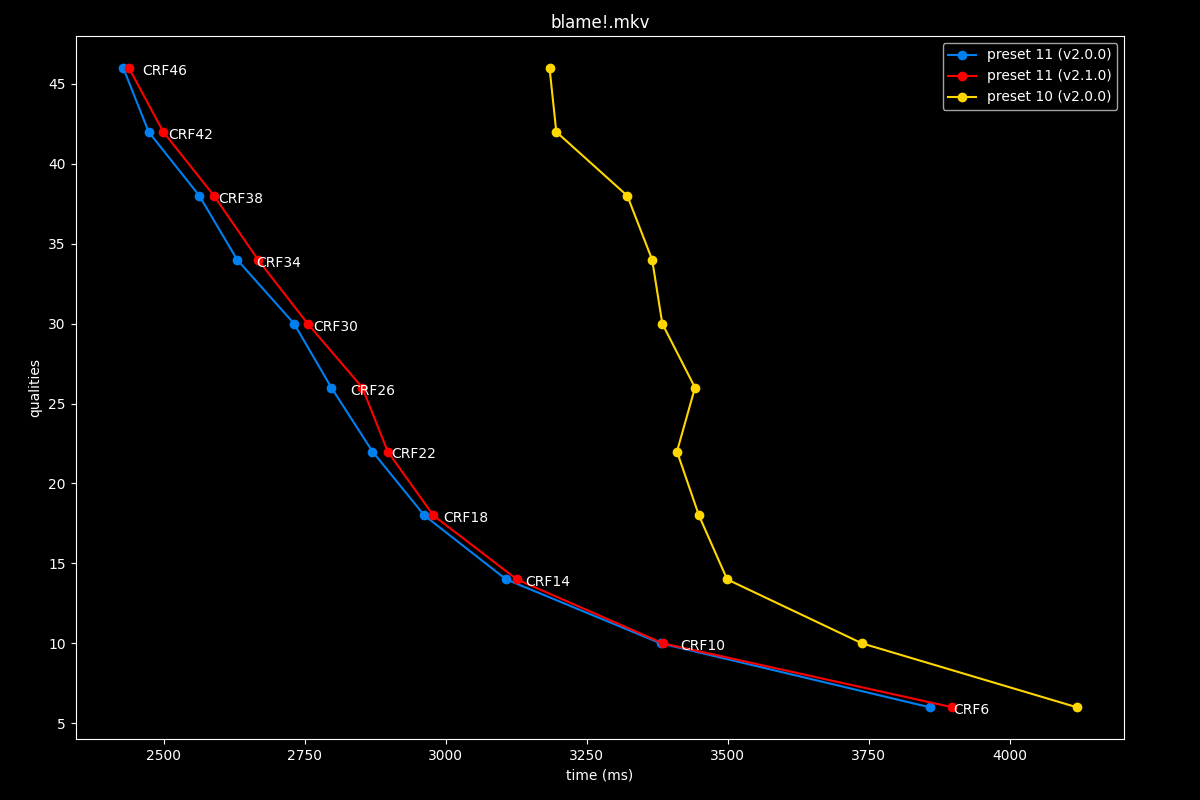
The first image is available above without JavaScript. The complete slide manifest lists every image and alternative description.
Preset 11’s speed is unchanged as well.
preset 12: v2.0.0 vs v2.1.0
- Efficiency graphs, high quality:
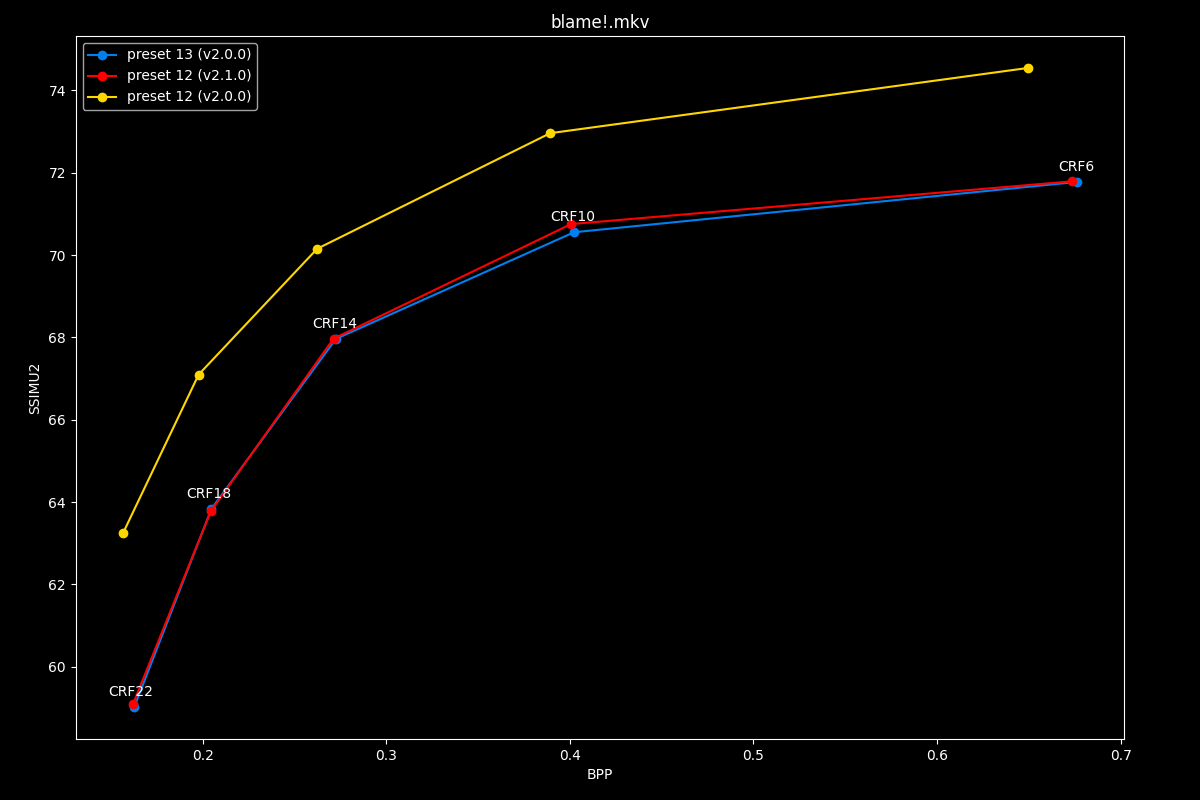
The first image is available above without JavaScript. The complete slide manifest lists every image and alternative description.
- Efficiency graphs, low quality:
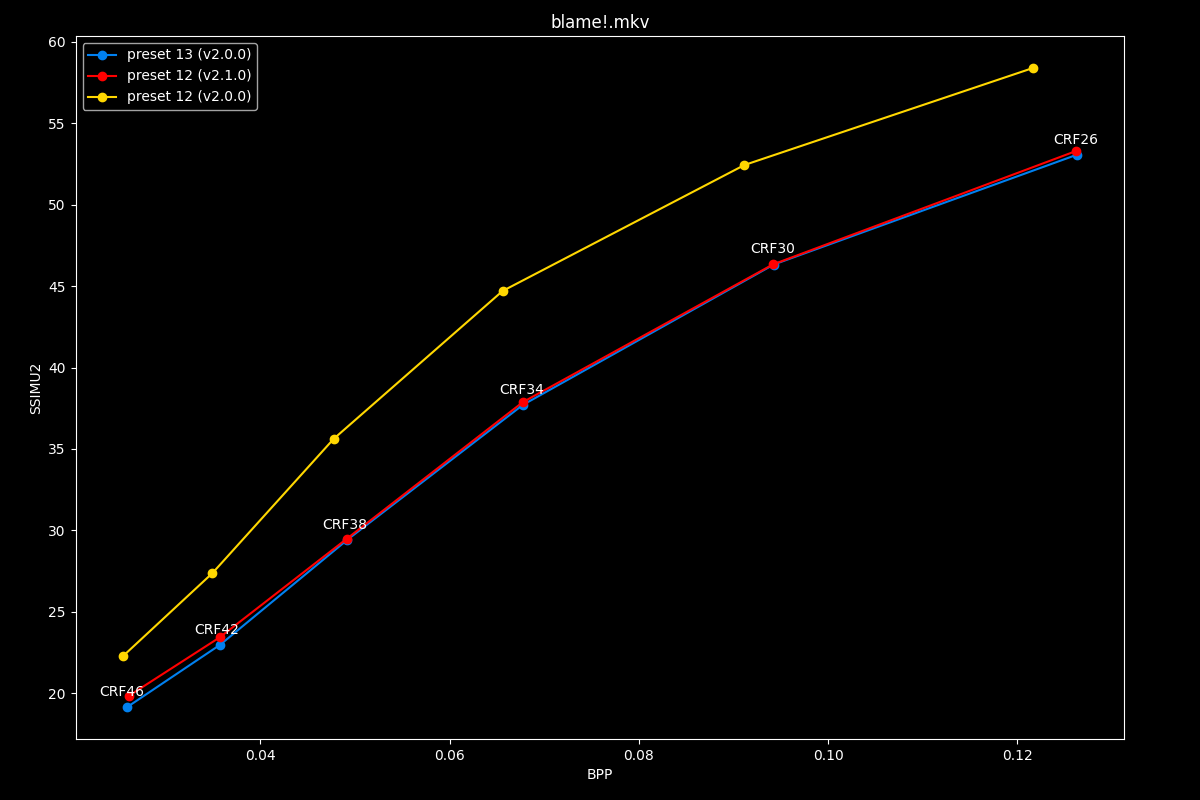
The first image is available above without JavaScript. The complete slide manifest lists every image and alternative description.
Just as preset 6, preset 12 is now mapped to 13, and unsurprisingly, its efficiency is equal to old 13.
- Speed graphs:
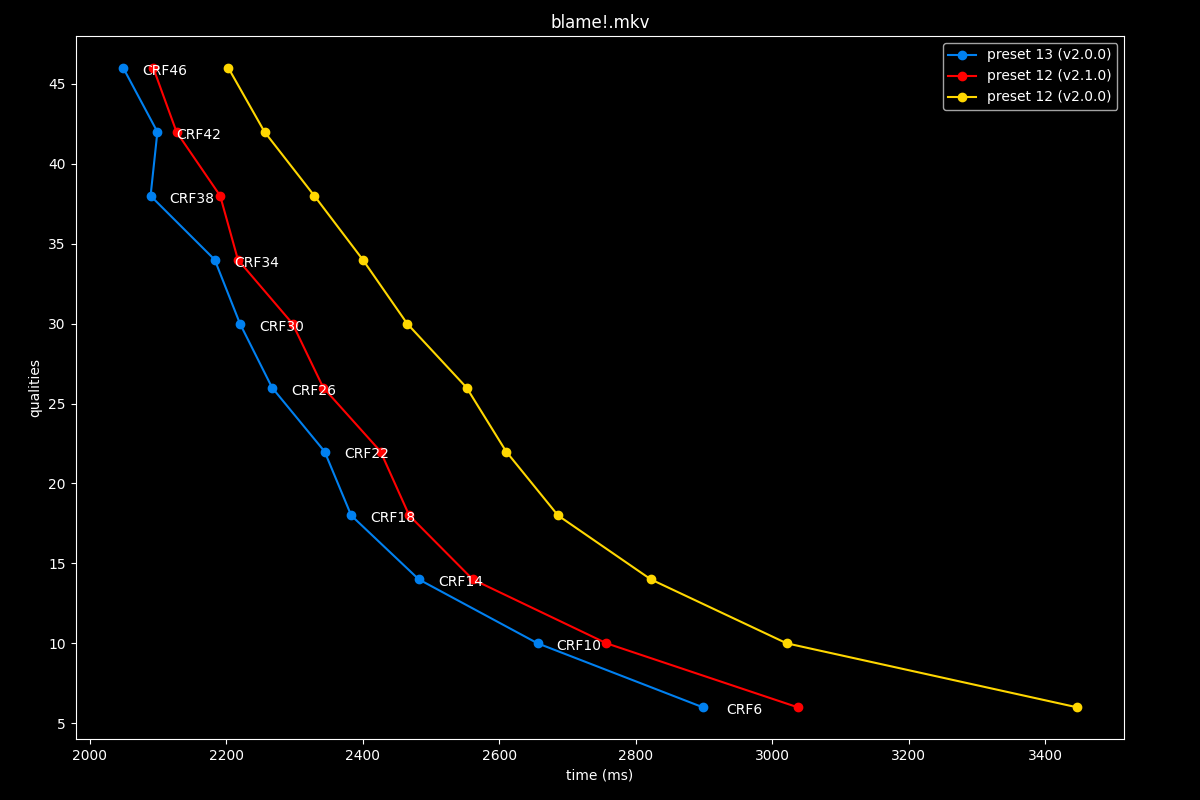
The first image is available above without JavaScript. The complete slide manifest lists every image and alternative description.
The speeds seem to be in-between old 12 and 13, so potentially a slight speedup. Still, nothing to get excited at.
TLDR
From these extensive comparisons, it appears that some presets have received genuine improvements in their respective efficiency/speed trade-off. Some presets, like -1, 0, 1 and 3, received the most significant improvements, followed by 4, 5 and 6 with overall beneficial new trade-offs. Preset 12 got slightly faster too. On the other hand, presets 8 and 10 seemed to have regressed slightly, and presets 2 and 9 are perfectly unchanged from v2.0.0.
Conclusion
The historical results suggest presets 2–4 as candidates for this animation workload, with faster presets worth measuring when time is constrained. They do not identify universally optimal settings. Parameters not retested here cannot be assumed unchanged.
SVT-AV1-PSY was active when the article was written; its original project subsequently announced its end. Its changed defaults and features were not tested by this comparison and should not be described as a free efficiency gain. Consult the project’s status notice and current SVT-AV1 guide for new work. The 2.1.0 release remains the version context for this article.
Future plans recorded by the author
My plans for the future regarding the blog post include:
- polishing this blog post.
- a follow-up article in the relatively near future about giving you encoding tips and explaining common AV1 encoding knowlegde, for instance showcasing why film grain synthesis is a game-changer or why chunked encoding can prove beneficial to your encoding pipeline.
- an article focused on observing the evolution of SVT-AV1 since the beginning of its development, as well as comparisons with current aomenc, rav1e and SVT-AV1-PSY, including a quick look at the current state of AVM (development ground for AV2) in comparison to VVC’s state.
Thanks for reading!